 Jupyter
Extension Migration Guide
JupyterLab 3.0 to 3.1
Following semver rules, API are compatible.
Jest configuration update
If you are using jest to test your extension, some new ES6 packages dependencies are added to JupyterLab.
They need to be ignore when transforming the code with Jest. You will need to update the
transformIgnorePatterns to match:
const esModules = [
  '@jupyterlab/',
  'lib0',
  'y\\-protocols',
  'y\\-websocket',
  'yjs'
].join('|');

// ...

transformIgnorePatterns: [`/node_modules/(?!${esModules}).+`]
For more information, have a look at Testing your extension.
Note
Here is an example of pull request to update to JupyterLab 3.1 in @jupyterlab/git extension:
https://github.com/jupyterlab/jupyterlab-git/pull/979/files
JupyterLab 2.x to 3.x
Here are some helpful tips for migrating an extension from JupyterLab 2.x to JupyterLab 3.x.
Upgrading library versions manually
To update the extensions so it is compatible with the 3.0 release, update the compatibility
range of the @jupyterlab dependencies in the package.json. The diff should be similar to:
index 6f1562f..3fcdf37 100644
^^^ a/package.json
+++ b/package.json
   "dependencies": {
-    "@jupyterlab/application": "^2.0.0",
+    "@jupyterlab/application": "^3.0.0",
Upgrading library versions using the upgrade script
JupyterLab 3.0 provides a script to upgrade an existing extension to use the new extension system and packaging.
First, make sure to update to JupyterLab 3.0 and install jupyter-packaging and cookiecutter. With pip:
pip install jupyterlab -U
pip install jupyter-packaging cookiecutter
Or with conda:
conda install -c conda-forge jupyterlab=3 jupyter-packaging cookiecutter
Then at the root folder of the extension, run:
python -m jupyterlab.upgrade_extension .
The upgrade script creates the necessary files for packaging the JupyterLab extension as a Python package, such as
setup.py and pyproject.toml.
The upgrade script also updates the dependencies in package.json to the ^3.0.0 packages. Here is an example diff:
index 6f1562f..3fcdf37 100644
^^^ a/package.json
+++ b/package.json
@@ -29,9 +29,13 @@
   "scripts": {
-    "build": "tsc",
-    "build:labextension": "npm run clean:labextension && mkdirp myextension/labextension && cd myextension/labextension && npm pack ../..",
-    "clean": "rimraf lib tsconfig.tsbuildinfo",
+    "build": "jlpm run build:lib && jlpm run build:labextension:dev",
+    "build:prod": "jlpm run build:lib && jlpm run build:labextension",
+    "build:lib": "tsc",
+    "build:labextension": "jupyter labextension build .",
+    "build:labextension:dev": "jupyter labextension build --development True .",
+    "clean": "rimraf lib tsconfig.tsbuildinfo myextension/labextension",
+    "clean:all": "jlpm run clean:lib && jlpm run clean:labextension",
   "clean:labextension": "rimraf myextension/labextension",
   "eslint": "eslint . --ext .ts,.tsx --fix",
   "eslint:check": "eslint . --ext .ts,.tsx",
@@ -59,12 +63,12 @@
   ]
   },
   "dependencies": {
-    "@jupyterlab/application": "^2.0.0",
-    "@jupyterlab/apputils": "^2.0.0",
-    "@jupyterlab/observables": "^3.0.0",
+    "@jupyterlab/builder": "^3.0.0",
+    "@jupyterlab/application": "^3.0.0",
+    "@jupyterlab/apputils": "^3.0.0",
+    "@jupyterlab/observables": "^3.0.0",
   "@lumino/algorithm": "^1.2.3",
   "@lumino/commands": "^1.10.1",
   "@lumino/disposable": "^1.3.5",
@@ -99,6 +103,13 @@
-    "typescript": "~3.8.3"
+    "typescript": "~4.0.1"
   },
   "jupyterlab": {
-    "extension": "lib/plugin"
+    "extension": "lib/plugin",
+    "outputDir": "myextension/labextension/"
   }
}
On the diff above, we see that additional development scripts are also added, as they are used by the new extension system workflow.
The diff also shows the new @jupyterlab/builder as a devDependency.
@jupyterlab/builder is a package required to build the extension as a federated (prebuilt) extension.
It hides away internal dependencies such as webpack, and produces the assets that can then be distributed as part of a Python package.
Extension developers do not need to interact with @jupyterlab/builder directly, but instead can use the
jupyter labextension build command. This command is run automatically as part of the build script
(jlpm run build).
For more details about the new file structure and packaging of the extension, check out the extension tutorial: Extension Tutorial
Publishing the extension to PyPI and conda-forge
Starting from JupyterLab 3.0, extensions can be distributed as a Python package.
The extension tutorial provides explanations to package the extension so it can be published on PyPI and conda forge: Publishing your extension.
Note
While publishing to PyPI is the new recommended way for distributing extensions to users,
it is still useful to continue publishing extensions to npm as well,
so other developers can extend them in their own extensions.
JupyterLab 1.x to 2.x
Here are some helpful tips for migrating an extension from JupyterLab 1.x to JupyterLab 2.x. We will look at two examples of extensions that cover most of the APIs that extension authors might be using:
@jupyterlab/debuggermigration pull request: https://github.com/jupyterlab/debugger/pull/337/files@jupyterlab/shortcutuimigration pull request: https://github.com/jupyterlab/jupyterlab-shortcutui/pull/53/files
Upgrading library versions
The @phosphor/* libraries that JupyterLab 1.x uses have been renamed to
@lumino/*. Updating your package.json is straightforward. The easiest
way to do this is to look in the
JupyterLab core packages code base
and to simply adopt the versions of the relevant libraries that are used
there.
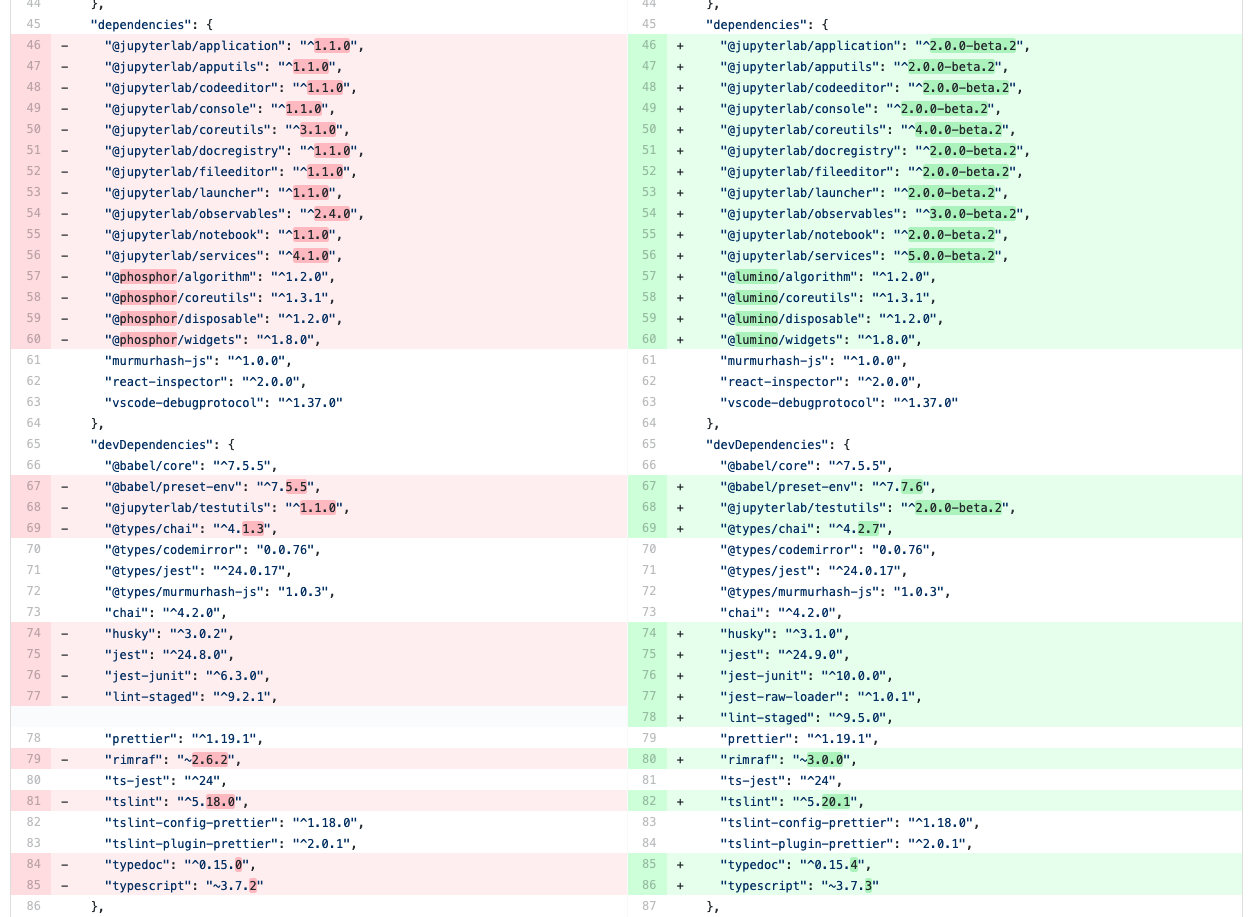
Updating the debugger extension’s libraries in package.json
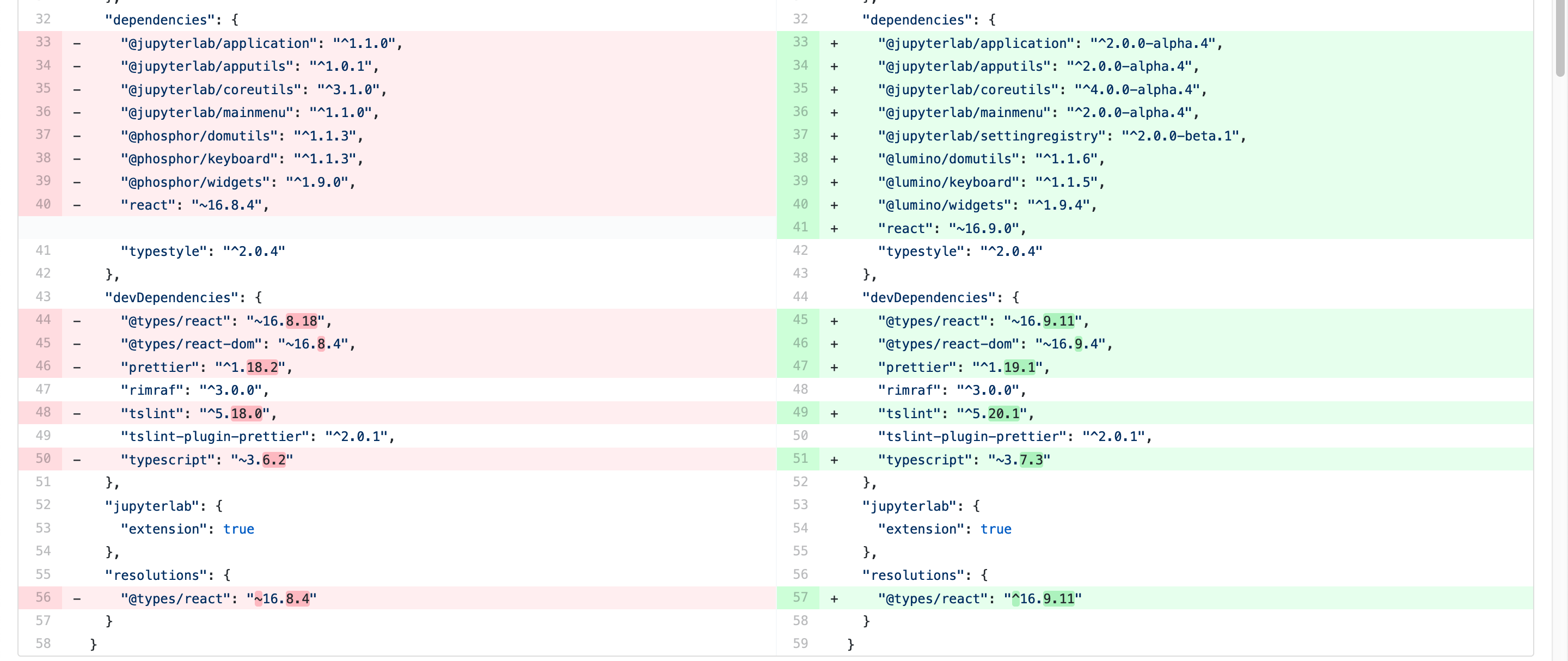
Updating the shortcuts UI extension’s libraries in package.json
Tip
In these examples, note that we are using the 2.0.0-beta.x version of
many libraries. This was to test the extensions against the JupyterLab 2.0
beta release before the final version. For the final release, your
package.json should depend on version ^2.0.0 of these packages.
Migrating from @phosphor to @lumino
^^^^^^^^^^^^^^^^^^^^^^^^^^^^^^^^^^^^^^^^^^-
The foundational packages used by JupyterLab are now all prefixed with the NPM
namespace @lumino instead of @phosphor. The APIs for these packages
have not changed. The @phosphor namespaced imports need to be updated to
the new @lumino namespaced packages:
|
|
|
|
|
|
|
|
|
|
|
|
|
|
|
|
|
|
|
|
|
|
|
|
|
|
|
|
|
|
|
|
Warning
p- prefixed CSS classes, data-p- attributes and p- DOM events
are deprecated. They will continue to work until the next major release of
Lumino.
.p-CSS classes such as.p-Widgetshould be updated to.lm-, e.g..lm-Widgetdata-p-attributes such asdata-p-dragscrollshould be updated todata-lm-, e.g.data-lm-dragscrollp-DOM events such asp-dragentershould be updated tolm-, e.g.lm-dragenter
Updating former @jupyterlab/coreutils imports
^^^^^^^^^^^^^^^^^^^^^^^^^^^^^^^^^^^^^^^^^^^^^^^^-
JupyterLab 2.0 introduces several new packages with classes and tokens that
have been moved out of @jupyterlab/coreutils into their own packages. These
exports have been moved.
Tip
It might be helpful to delete node_modules and yarn.lock when
updating these libraries.
Export |
Package |
|---|---|
|
|
|
|
|
|
|
|
|
|
|
|
|
|
|
|
|
|
|
|
|
|
|
|
|
|
|
|
|
|
|
|
|
|
|
|
|
|
|
|
Using Session and SessionContext to manage kernel sessions
Note
For full API documentation and examples of how to use
@jupyterlab/services,
consult the repository.
ConsolePanel and NotebookPanel now expose a
sessionContext: ISessionContext attribute that allows for a uniform way to
interact with kernel sessions.
Any widget that matches the interface IDocumentWidget has a
context: DocumentRegistry.IContext attribute with a
sessionContext: ISessionContext attribute.
For example, consider how the @jupyterlab/debugger extension’s
DebuggerService updated its isAvailable() method.
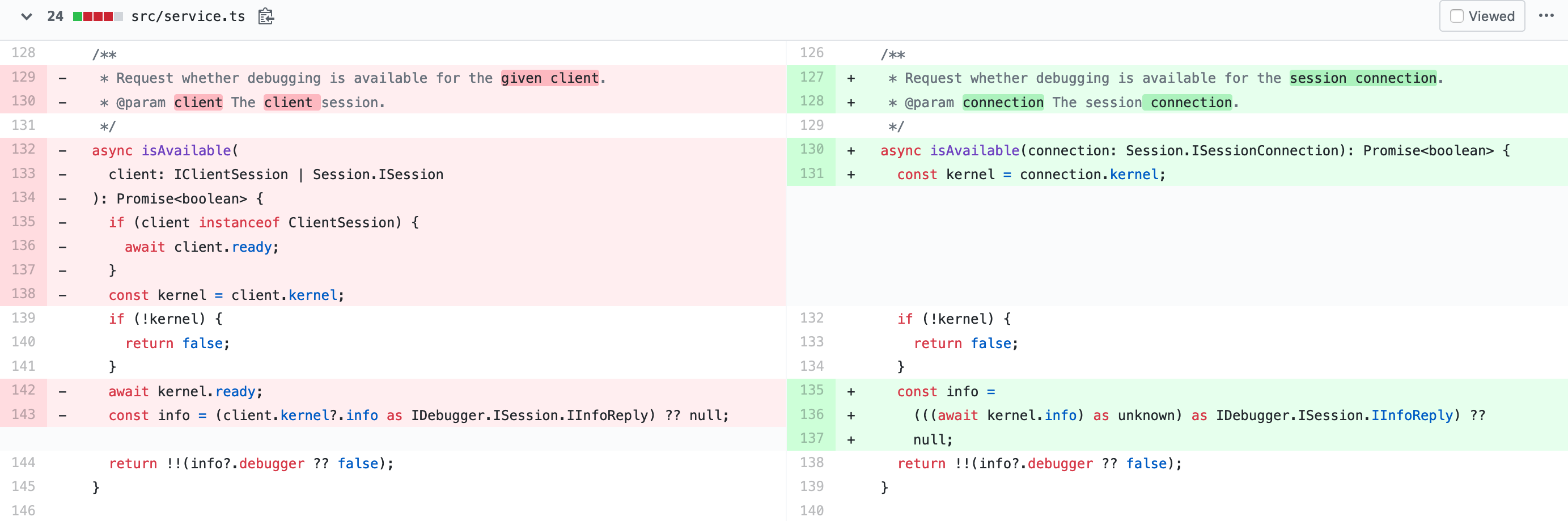
From the PR migrating the debugger extension to JupyterLab 2.0
Note
await kernel.ready is no longer necessary before the kernel connection
kernel can be used. Kernel messages will be buffered as needed while a
kernel connection is coming online, so you should be able to use a kernel
connection immediately. If you want to retrieve the kernel info (or if for
some other reason you want to wait until at least one message has returned
from a new kernel connection), you can do await kernel.info.
Using the new icon system and LabIcon
Note
For full API documentation and examples of how to use
the new icon support based on LabIcon from @jupyterlab/ui-components,
consult the repository.