


Extension Migration Guide#
JupyterLab 4.6 to 4.7 (not released yet)#
API updates#
Xterm.js, used by
@jupyterlab/terminal, was upgraded from 5.x to 6.x, along with the@xterm/addon-fit,@xterm/addon-search,@xterm/addon-web-linksand@xterm/addon-webgladdons. Notable changes for extensions that interact with the terminal:@xterm/addon-canvaswas removed upstream; when WebGL is not available the terminal now falls back to the built-in DOM renderer, so the terminal may not contain a<canvas>element anymore.The search addon no longer applies the
xterm-find-active-result-decorationCSS class; the active match is distinguished by its colors instead.The scrollbar is now rendered by a custom scrollable element instead of a native
overflow-y: scrollviewport; extensions styling or querying.xterm-viewportmay need updating.Extensions depending on
@xterm/*packages themselves, for example to type against theTerminal.searchAddongetter of@jupyterlab/terminal, should update them to the versions used by@jupyterlab/terminal(@xterm/xterm6.x and the matching addons).
JupyterLab 4.5 to 4.6#
Migrating to jupyter-builder#
JupyterLab’s build tooling has moved out of the JupyterLab repository into a standalone package: jupyter-builder (PyPI) and @jupyter/builder (npm). Existing extensions continue to work, but we recommend migrating so your build no longer depends on a full JupyterLab installation.
JupyterLab 4.6 also no longer depends on setuptools at runtime. If your extension uses setuptools-based packaging or build hooks, add setuptools to your own package requirements explicitly, or migrate to a PEP 517/518 build backend in pyproject.toml.
The migration to jupyter-builder is two small changes:
1. Update pyproject.toml#
Replace jupyterlab in your build requirements with jupyter-builder:
# Before
requires = ["hatchling>=1.5.0", "jupyterlab>=4.0.0,<5", "hatch-nodejs-version>=0.3.2"]

# After
requires = ["hatchling>=1.5.0", "hatch-nodejs-version>=0.3.2", "jupyter-builder>=1.0.0"]
2. Update package.json#
Replace @jupyterlab/builder with @jupyter/builder in your dependencies:
"@jupyter/builder": "^1.0.0"
Then update your build scripts to use the new CLI:
"build:labextension": "jupyter-builder build .",
"build:labextension:dev": "jupyter-builder build --development True .",
"watch:labextension": "jupyter-builder watch ."
That’s it. Your extension now builds without pulling in all of JupyterLab.
Building extensions with Rspack#
In the upcoming 4.6, JupyterLab will use Rspack instead of Webpack to build extensions. Since Rspack strives for compatibility with Webpack, no changes should be needed in most extensions and extensions built with either system should interoperate with each other. However, if an extension uses the experimental Custom Rspack config option, it may need to migrate its custom Webpack config to Rspack.
API Updates#
The
currentFrameChangedsignal in theIDebugger.Model.ISourcesinterface has been deprecated and will be removed in 5.0.The
@jupyterlab/coreutilsLruCachenow throws an error if themaxSizeis less than 1.Synchronization properties (
syncEditableandsyncCollapse) of theCellclass and its derivatives, as well asCodeCell.syncScrolled, now default toundefinedrather thanfalse. In notebook initialization, these values are now only set totrueifundefined, so custom notebook content factories (IContentFactory) can explicitly set them totrueorfalsewithout being overwritten later.JupyterLab now depends on
@jupyter/ydocv4, which sets the shared document dirty state totrueafter every change, except forsetSource()(and thesourcesetter) which is used for document initialization. With that, JupyterLab’s document dirty indicator is now fully backed by a shared model.
Testing with Galata#
The
runCell()method of notebook helper now takesoptions: {inplace?: boolean; wait?: boolean}as a second argument. Setting thewaitoption tofalseskips waiting for the cell execution to finish, but still waits until the execution has been scheduled.When
autoGotois enabled, the workspace is now reset automatically; to opt out, setresetWorkspacefixture tofalse.The galata’s
page.waitForCondition()now uses a default timeout of 15 seconds, simplifying debugging and reducing time to retry. Thetimeoutargument can be used to control the timeout duration.Errors after page fixture teardown are now gracefully ignored to prevent the errors from delayed server requests from failing tests during the teardown phase.
JupyterLab 4.5.0 to 4.5.1#
IDefaultContentProvider#
As part of the 4.5.0 release, a new token IDefaultContentProvider was wrongfully made public. The 4.5.1 release makes it deprecated and the token will be removed in 5.0.
JupyterLab 4.4 to 4.5#
File Browser updates#
The file browser now emits a selectionChanged signal when the selected files and folders change.
If you maintain an extension which implements a subclass of DirListing that changes selection, it is recommended to
emit the selectionChanged signal when the selection changes. This will ensure that any listeners to the
selectionChanged signal are notified of the change.
API updates#
The
NbConvert.IManagerinterface was fixed to not require classes implementing the interface to provide a concreteNbConvertManagerclass. In addition, this interface now includes an optionalexportAsmethod to export (and optionally download) a notebook to a specific format.The
NbConvertManager.IExportFormatsinterface was moved to theNbConvertnamespace. You should now useNbConvert.IExportFormatsinstead ofNbConvertManager.IExportFormats.NbConvertManager.IExportFormatswas however kept for backward compatibility.The
renameDialogfunction has been deprecated. To display a rename dialog, useDocumentManagerDialogs.renameinstead.
extra_labextensions_path ordering#
The default labextension paths now take precedence over those found in extra_labextensions_path. In other words,
BaseExtensionApp.labextensions_path now lists the extensions from LabApp.labextensions_path
before those found in extra_labextensions_path.
JupyterLab 4.3 to 4.4#
Icons#
The @jupyterlab/debugger icons were moved to @jupyterlab/ui-components.
The icons in use are in the ui-components/style/icons/debugger folder, while the unused icons in the @jupyterlab/debugger package are in the ui-components/style/unused/ folder.
Before |
After |
|---|---|
|
|
|
|
|
|
|
|
|
|
|
|
|
|
|
|
|
|
|
|
|
|
TypeScript update#
As a follow-up to the update to TypeScript 5.5, the tsconfig.json configuration of the @jupyterlab/buildutils package changed
the module option from commonjs to Node16:
index 7095bede4bd5..8c5bff0d45d8 100644
--- a/buildutils/tsconfig.json
+++ b/buildutils/tsconfig.json
@@ -3,7 +3,7 @@
  "compilerOptions": {
    "outDir": "lib",
    "rootDir": "src",
-   "module": "commonjs",
+   "module": "Node16",
    "moduleResolution": "node16"
  },
  "include": ["src/*"],
Support for Conditional Rendering in GroupItem#
As of JupyterLab 4.4, the GroupItem component now supports conditional
rendering of elements. This improvement allows the component to gracefully handle null or
undefined children, eliminating the need for placeholder elements like <div></div>.
Recommended Update for Extension Authors:
Review your usage of GroupItem and replace any empty elements used as placeholders
with null values. This change ensures cleaner and more maintainable code while leveraging
the updated rendering logic.
Example Update:
Before:
<GroupItem spacing={8}>{condition ? <SomeComponent /> : <div></div>}</GroupItem>
After:
<GroupItem spacing={8}>{condition ? <SomeComponent /> : null}</GroupItem>
This change improves both the rendering performance and the maintainability of extensions
using the GroupItem component.
API updates#
The
ConfigSection.create(options: ConfigSection.IOptions)function has been deprecated. : This was previously exposed as a helper function to create config sections on the Jupyter Server. Instead, require theIConfigSectionManagertoken in a plugin, and use thencreatemethod to create a config section:
const plugin: JupyterFrontEndPlugin<void> = {
  id: 'example',
  requires: [IConfigSectionManager],
  activate: (
    app: JupyterFrontEnd,
    configSectionManager: ConfigSection.IManager
  ): void => {
    const section = configSectionManager.create({ name: 'notebook' });
  }
};
Plugins#
@jupyterlab/application-extensionfrom 4.3 to 4.4 : - The@jupyterlab/application:mimedocumentplugin id has been renamed to@jupyterlab/application-extension:mimedocument@jupyterlab/help-extensionfrom 4.3 to 4.4 : - The@jupyterlab/help-extension:licencesplugin id has been moved to the@jupyterlab/apputils-extensionextension, and is now split between@jupyterlab/apputils-extension:licenses-clientand@jupyterlab/apputils-extension:licenses-plugin@jupyterlab/lsp-extensionfrom 4.3 to 4.4 : - The@jupyterlab/lsp:ILSPCodeExtractorsManagerplugin id has been renamed to@jupyterlab/lsp-extension:code-extractor-manager@jupyterlab/translation-extensionfrom 4.3 to 4.4 : - The@jupyterlab/translation:translatorplugin id has been renamed to@jupyterlab/translation-extension:translator@jupyterlab/workspaces-extensionfrom 4.3 to 4.4 : - The@jupyterlab/workspaces:commandsplugin id has been renamed to@jupyterlab/workspaces-extension:commands
JupyterLab 4.2 to 4.3#
CSS styling#
Previously JupyterLab was leaking CSS rules globally. Starting from 4.3, this is not the case anymore. The side effects for extensions are:
DOM elements attached outside the application shell may have broken styles. To fix this, you should add the class
jp-ThemedContainerto the DOM elements added outside the application shell.DOM elements
code,kbd,pre,sampandttmay have broken styles. To fix this, prepend the class.jp-ThemedContainerto your rule; e.g..jp-Inspector-content prebecomes.jp-ThemedContainer .jp-Inspector-content pre
The jp-Inspector-default-content class was renamed to jp-Inspector-placeholderContent.
The name of this contextual help class is now consistent with the equivalent table of contents and property inspector classes.
JupyterLab 4.3 updated to its dependency on @lumino/widget to the 2.5.0 version, which removed the following global styling
of widgets:
.lm-Widget {
  overflow: hidden;
}
If you notice some inconsistencies with the styling of your extension, you may need to add this general rule back to the CSS of your extension, or (preferably) scope it to the relevant widgets.
Testing with Galata#
Playwright was updated to version 1.46.1 (or higher). The changelog for version 1.46.0 mentions a possible
breaking change when defining fixture values that are array of objects.
See the Playwright 1.46.0 release notes for more information.
JupyterLab 4.1 to 4.2#
API updates#
The
CodeEditor.ICoordinateinterface was corrected to not includetoJSON(),x,y,widthandheight; these properties were never set by methods returningICoordinateand they were never used by methods accepting it.CodeEditor.getCoordinateForPositionreturn type was corrected to clarify that it can returnnull; previouslynullcould be returned despite the return type indicating it would always return a non-nullICoordinatevalue.The commands
workspace-ui:saveandworkspace-ui:save-aswere moved from the@jupyterlab/apputils-extension:workspacesplugin to a new dedicated@jupyterlab/workspaces-extensionpackage and can be explicitly required by requesting theIWorkspaceCommandstoken. This token is by default provided by the new@jupyterlab/workspaces-extension:commandsplugin. The@jupyterlab/apputils-extension:workspacesplugin now only defines the workspace MIME type renderer used to open files with.jupyterlab-workspaceextension as JupyterLab workspaces.The cell toolbar node has been moved from the cell node to the cell input node. Therefore the parent of the cell toolbar has changed and can not be used directly to retrieve the corresponding cell node anymore.
Shortcuts extension rework#
The @jupyterlab/shortcuts-extension package was reworked to fix multiple bugs and increase type safety.
While this package does not expose any programmatic APIs, and changes to the theming were minimal,
the major version of the package was increased to 5.0 to reflect the extend of the changes.
No action is required from extension authors (unless you used non-public components from /lib),
however the authors of applications built on top of JupyterLab components are encouraged to upgrade
to this new version as it can significantly improve the user experience.
JupyterLab 4.0 to 4.1#
Plugin manager and extension locks#
Prior to JupyterLab 4.1 there was no mechanisms: - for users to disable/enable individual plugins (rather than entire extensions) - for administrators to fully block users from enabling/disabling certain extensions
This version of JupyterLab enables both with the addition of Plugin Manager.
If your installation had any plugins disabled these will be automatically locked
on the first startup to ensure that there is no change to user-exposed functionality. The plugin manager
itself can be disabled and locked using jupyter labextension commands, but we recommend to instead
lock individual plugins as required.
If your extension previously included a custom enable/disable setting, you may be able to replace it with instructions pointing users to the Plugin Manager. However, please consider whether your extension may be used in distributions which do not include Plugin Manager or have it disabled.
CSS class name change in the WindowedList superclass of StaticNotebook#
The class
.jp-WindowedPanel-windowhas been renamed to.jp-WindowedPanel-viewport.The notebook scroll container is now
.jp-WindowedPanel-outerrather than.jp-NotebookGalata notebook helpers
getCellandgetCellCountwere updated accordingly
Change of notebook focus handling impacting command-mode shortcut selectors#
Previously, focus in the notebook would revert to the notebook HTML node when switching to command mode, which was preventing Tab navigation between cells, especially impacting users with accessibility needs. In JupyterLab 4.1+ the focus stays on the active cell when switching to command mode; this requires all shortcut selectors to be adjusted as follows:
.jp-Notebook:focus.jp-mod-commandMode,.jp-Notebook:focus, and[data-jp-traversable]:focusshould be replaced with: -.jp-Notebook.jp-mod-commandMode :focus:not(:read-write)for JupyterLab 4.1.0+ -.jp-Notebook.jp-mod-commandMode:not(.jp-mod-readWrite) :focusfor JupyterLab 4.1.1+[data-jp-kernel-user]:focusshould be replaced with: -[data-jp-kernel-user] :focus:not(:read-write)for JupyterLab 4.1.0+ -[data-jp-kernel-user]:not(.jp-mod-readWrite) :focus:not(:read-write)for JupyterLab 4.1.1+
Please note that :not(:read-write) fragment disables shortcuts
when text fields (such as cell editor) are focused to avoid intercepting
characters typed by the user into the text fields, however if your shortcut
does not correspond to any key/typographic character (e.g. most shortcuts
with Ctrl modifier) you may prefer to drop this fragment
if you want the shortcut to be active in text fields.
Further, JupyterLab 4.1.1 introduced indicator class .jp-mod-readWrite
that is applied to the notebook node when the active element accepts
keyboard input as defined by :read-write selector. This indicator
class is required to detect :read-write elements which are nested
within an open shadow DOM (such as Panel framework widgets).
If your framework uses a closed shadow DOM, or expects keyboard
interactions on elements that are not recognised as editable by browser
heuristics of :read-write selector, you need to set a data attribute
lm-suppress-shortcuts on the outer host element to suppress shortcuts.
To prevent breaking the user experience these changes are made transparently in the background, but will emit a warning and extension developers should make the change at the source before the next major JupyterLab release.
Visibility of StatusBar elements at high magnifications#
Statusbar items are now hidden by default at high magnification/low resolution to prevent overlap for those using the application at high magnifications.
An additional
priorityproperty has been added to the options ofIStatusBar.registerStatusItemmethod to allow the status bar item to remain visible; the intended usage is for small statusbar items that either add functionality that would be particularly useful at high zoom or is inaccessible otherwise.
JupyterLab 3.x to 4.x#
Because of significant type changes from JupyterLab 3.x to 4.x, we recommend publishing a new major version of your extension to work with each major version of JupyterLab. For examples of extensions that use different major versions for Lab 3 and Lab 4, see jupyterlab-vim and jupyter-ai.
Upgrading extension using the upgrade script#
JupyterLab 4.x provides a script to upgrade an existing extension to use the new extension system and packaging.
Note
Back up your extension - the best if you use a version control like git, is to work on a new branch.
First, make sure to update to JupyterLab 4 and install copier and some dependencies. With pip:
pip install -U jupyterlab[upgrade-extension]
Or with conda:
conda install -c conda-forge jupyterlab=4 "copier=9" jinja2-time
Then at the root folder of the extension, run:
python -m jupyterlab.upgrade_extension .
The upgrade script creates the necessary files for packaging the JupyterLab extension as a Python package.
The script will ask you for all files if you want to override them or not. By default the configuration files
will be overridden for the newer version. In particular, if you were using Python setuptools (aka setup.py
and/or setup.cfg), you will like need to update the pyproject.toml file (see
PEP example).
The upgrade script also updates the dependencies in package.json to the ^4.0.0 packages.
For more details about the new file structure and packaging of the extension, check out the extension tutorial: Extension Tutorial
Note
You will need to modify the code of your extension if it is impacted by the API changes mentioned below.
jlpm#
The utility jlpm uses Yarn 3 (previously Yarn 1). This will require updating your
package configuration.
Create a file
.yarnrc.ymlcontaining:
nodeLinker: node-modules
Add to
.gitignore
.yarn/
Run
jlpmThis will reset youryarn.lockcontent as its format has changed.
Note
You can find more information on upgrading Yarn from version 1 to version 3 in Yarn documentation.
If you are hit by multiple versions of the same packages (like @lumino/widgets),
TypeScript may complain that the types are not matching. One possible solution
is to force packages deduplication using:
jlpm dlx yarn-berry-deduplicate
API breaking changes#
Note
With JupyterLab 4.x, the npm package version policy changed to not bump major version with the Python package unless required to ease extension compatibility.
Here is a list of JupyterLab npm packages that encountered API changes and therefore have
bumped their major version (following semver convention). We want to point out particularly
@jupyterlab/documentsearch and @jupyterlab/toc API that have been fully reworked.
@jupyterlab/applicationfrom 3.x to 4.x : - Major version bump to allow alternateServiceManagerimplementations inJupyterFrontEnd. Specifically this allows the use of a mock manager. This also makes theJupyterLab.IOptionsmore permissive to not require a shell when options are given and allow a shell that meets theILabShellinterface. As a consequence, all other@jupyterlab/packages have their major version bumped too. See jupyterlab/jupyterlab#11537 for more details.Rename token
@jupyterlab/apputils:IConnectionLostto@jupyterlab/application:IConnectionLost.
@jupyterlab/apputilsfrom 3.x to 4.x : - RenameIToolbarWidgetRegistry.registerFactorytoIToolbarWidgetRegistry.addFactoryISanitizerandISanitizer.IOptionsare deprecated in favor ofIRenderMime.ISanitizerandIRenderMime.ISanitizerOptionsin@jupyterlab/rendermime-interfaces.Global
sessionContextDialogsis removed; you should request the tokenISessionContextDialogs(from@jupyterlab/apputils).
@jupyterlab/attachmentsfrom 3.x to 4.x : RemovedmodelDBfromIAttachmentsModel.IOptions.@jupyterlab/buildutilsfrom 3.x to 4.x : - Thecreate-themescript has been removed. If you want to create a new theme extension, you should use the TypeScript extension template (choosingthemeaskind) instead.The
add-siblingscript has been removed. Check out Development workflow for source extensions instead.The
exitOnUuncaughtExceptionutil function has been renamed toexitOnUncaughtException(typo fix).
@jupyterlab/cellsfrom 3.x to 4.x : -MarkdownCell.toggleCollapsedSignalrenamedMarkdownCell.headingCollapsedChangedTo support notebook windowing, cell widget children (e.g. the editor or the output area) are not instantiated when the cell is attached to the notebook. You can test forisPlaceholder()to see if the cell has been fully instantiated or wait for the promisereadyto be resolved. Additionally an attributeinViewportand a signalinViewportChangedare available to test if the cell is attached to the DOM. If you instantiate standalone cells outside of a notebook, you will probably need to set the constructor optionplaceholdertofalseto ensure direct rendering of the cell.InputArea.defaultContentFactoryandCell.defaultContentFactoryhave been removed. If you need it, you can request the tokenIEditorServicesfrom@jupyterlab/codeeditor. Then you can usenew Cell.ContentFactory({ editorFactory: token.factoryService.newInlineEditor });.
@jupyterlab/celltagsfrom 3.x to 4.0 The@jupyterlab/celltagspackage has been removed and replaced by a widget in@jupyterlab/celltags-extension. This widget is now rendered using@jupyterlab/metadataform.@jupyterlab/codeeditorfrom 3.x to 4.0 : -CodeEditor.IEditorhas changed: : -resizeToFit()is removed -addKeydownHandler()is removed - you should add a CodeMirror extensionEditorView.domEventHandlerswith :Prec.high(to ensure it is not captured by keyboard shortcuts). -injectExtension()added as experimental to inject a CodeMirror extension - you should prefer registering : new extensions withIEditorExtensionRegistry.CodeEditor.IOptionshas two new optional attributes: : -extensions?: Extensions[]to provide custom extensions at editor instantiationinline?: booleanwhether the editor is a subpart of a document (like the notebook) or not.
CodeEditorWrapper.IOptionshas changed to{ factory, model, editorOptions }.CodeViewerWidget.IOptionshas changed to{ factory, model, editorOptions }.
@jupyterlab/codemirrorfrom 3.x to 4.0 : - Configuration parameters changes: : -fontFamily,fontSizeandlineHeight: grouped in a nestedcustomStylesdictionary. -insertSpaces: changed forindentUnitthat can take a value within [‘Tab’, ‘1’, ‘2’, ‘4’, ‘8’] -lineWrap: changed - it is now a boolean. -showTrailingSpace: renamedhighlightTrailingWhitespace-coverGutterNextToScrollbar: removed -electricChars: removed -extraKeys: removed - you should register new keymap using the CodeMirror extensionkeymap.of(KeyBinding[])-handlePaste: removed -keymap: removed -lineSeparator: removed - Line separator are normalized to\n-lineWiseCopyCut: removed - this is the default behavior -scrollbarStyle: removed -styleSelectedText: removed -selectionPointer: removed -wordWrapColumn: removedModehas been removed. You can instead request the tokenIEditorLanguageHandler. That provides similar API: -Mode.registerModeInfo->IEditorLanguageHandler.addLanguage-Mode.ensure()->IEditorLanguageHandler.getLanguage()-Mode.modeList->IEditorLanguageHandler.getLanguages()-Mode.run()->IEditorLanguageHandler.highlight()-Mode.findBest()->IEditorLanguageHandler.findBest()-Mode.findByName()->IEditorLanguageHandler.findByName()-Mode.findByMIME()->IEditorLanguageHandler.findByMIME()-Mode.findByExtension()->IEditorLanguageHandler.findByExtension()EditorSyntaxStatusmoved to@jupyterlab/fileeditor
@jupyterlab/codemirror-extensionfrom 3.x to 4.0 : - Moved commands: -codemirror:change-theme->fileeditor:change-theme(moved to@juptyerlab/fileeditor-extension) -codemirror:change-mode->fileeditor:change-language(moved to@juptyerlab/fileeditor-extension) -codemirror:find->fileeditor:find(moved to@juptyerlab/fileeditor-extension) -codemirror:go-to-line->fileeditor:go-to-line(moved to@juptyerlab/fileeditor-extension)Removed command:
codemirror:change-keymapMoved plugins: -
@jupyterlab/codemirror-extension:commandsintegrated within@jupyterlab/fileeditor-extension:plugin-@jupyterlab/codemirror-extension:editor-syntax-status->@jupyterlab/fileeditor-extension:editor-syntax-status-@jupyterlab/codemirror-extension:editor-syntax-status->@jupyterlab/fileeditor-extension:editor-syntax-status
@jupyterlab/completerfrom 3.x to 4.x : Major version was bumped following major refactor aimed at performance improvements and enabling easier third-party integration.Adding custom completion suggestions (items): : - In 3.x and earlier adding custom completion items required re-registering the completer connector for each file/cell using
registermethod of old manager provided byICompletionManagertoken; in 4.x this token and associatedICompletableAttributesinterface was removed and a proper method of registering a custom source of completions (a provider of completions) was added. To create a completer provider for JupyterLab, users need to implement theICompletionProviderinterface and then register this provider withICompletionProviderManagertoken.In 3.x merging completions from different sources had to be performed by creating a connector internally merging results from other connectors. in 4.x
IProviderReconciliatoris used to merge completions from multiple providers, and can be customised in constructor for custom completion handlers (CompletionHandler); customizing reconciliator in JupyterLab-managed completers is not yet possible.
Rendering with
Completer.IRenderer: : - In 3.x it was not possible to easily swap the renderer of JupyterLab-managed completers. In 4.x the renderer from the completion provider with highest rank is now used for all JupyterLab-managed completers. This behaviour is subject to revision in the future (please leave feedback).Completer box is now using delayed rendering for off-screen content to improve time to first paint for top suggestions. To position the completer without rendering all items we search for the widest item using heuristic which can be adjusted in custom renderers (
itemWidthHeuristic).The documentation panel now implements a loading indicator (a progress bar) customizable via optional
createLoadingDocsIndicatorrenderer method.createItemNodewas removed in favour ofcreateCompletionItemNodewhich is now required.createCompletionItemNodeis no longer responsible for sanitization of labels which is now a responsibility of the model (see below).
Model: : - In 3.x it was not possible to easily swap the model of JupyterLab-managed completers. In 4.x the model factory from the completion provider with highest rank is now used for JupyterLab-managed completers. This behaviour is subject to revision in the future (please leave feedback).
Old methods for updating and accessing the completion items:
setOptions,options, anditemswere removed in favour ofcompletionItemsandsetCompletionItemswhich are now required members ofCompleter.IModel.New signal
queryChangedwas added and has to be emitted by models.Model is now responsible for sanitization of labels and preserving original label on
insertTextattribute (if not already defined); this change was required to properly handle escaping of HTML tags.
@jupyterlab/codeeditorfrom 3.x to 4.x : - RemoveISelectionStyle(and thereforedefaultSelectionStyleandIEditor.selectionStyle). This was envisaged for real-time collaboration. But this is not used in the final implementation.@jupyterlab/consolefrom 3.x to 4.x : The type ofIConsoleHistory.sessionContexthas been updated toISessionContext | nullinstead ofISessionContext. This might break the compilation of plugins accessing thesessionContextfrom aConsoleHistory, in particular those with the strict null checks enabled.@jupyterlab/coreutilsfrom 3.x to 4.x : TheTimenamespace does not use themomentlibrary anymore for managing dates. Instead it switched to using theIntlAPI now available in modern web browsers. TheTime.formatfunction is still available but does not accept thetimeFormatargument anymore.@jupyterlab/debuggerfrom 3.x to 4.x : - The commanddebugger:pausecommand ID has been renameddebugger:pause-on-exceptionsto avoid ambiguity with pausing the current running thread.@jupyterlab/docmanagerfrom 3.x to 4.x : - TherenameDialognow receives theDocumentRegistry.Contextinstead of a path.The interface
DocumentManager.IWidgetOpeneris nowIDocumentWidgetOpenerand is provided by a new plugin@jupyterlab/docmanager-extension:opener. TheIDocumentWidgetOpenerinterface also now defines an`opened`signal that is emitted when a widget is opened.Removed the property
docProviderFactoryfrom the interfaceDocumentManager.IOptions.
@jupyterlab/docregisterfrom 3.x to 4.x : -TextModelFactory.preferredLanguage(path: string)will always return''. The editor languages is not available globally to provided it. You can recover the feature if needed, by requesting the tokenIEditorLanguageHandlerfrom@jupyterlab/codemirror. Then you can usetoken.findByFileName(widget.context.path)?.name ?? ''.@jupyterlab/docproviderfrom 3.x to 4.x : This package is no longer present in JupyterLab. For documentation related to Real-Time Collaboration, please check out RTC’s documentation@jupyterlab/docregistryfrom 3.x to 4.x : - Removed the propertydocProviderFactoryfrom the interfaceContext.IOptions.The constructor of the class
DocumentModelreceives a parameterDocumentModel.IOptions.The method
IModelFactory.createNewreceives a parameterDocumentRegistry.IModelOptions.The method
TextModelFactory.createNewreceives a parameterDocumentModel.IOptions.
@jupyterlab/documentsearchfrom 3.x to 4.x : -@jupyterlab/documentsearch:pluginhas been renamed to@jupyterlab/documentsearch-extension:plugin@jupyterlab/documentsearch:labShellWidgetListenerhas been renamed to@jupyterlab/documentsearch-extension:labShellWidgetListener
This may impact application configuration (for instance if the plugin was disabled). The search provider API has been fully reworked. But the logic is similar, for new type of documents you will need to register a
ISearchProviderFactoryto theISearchProviderRegistry. The factory will build aISearchProviderfor the document widget.@jupyterlab/extensionmanagerfrom 3.x to 4.x : The frontend API has been drastically reduced to fetch all information from the backend. It is now advised that you implement a customExtensionManagerclass for your needs rather than overriding the frontend plugins. Seejupyterlab/extensions/pypi.pyfor an example using PyPI.org and pip. You can then register your manager by defining an entry point in the Python package; seepyproject.toml::project.entry-points."jupyterlab.extension-manager_v1".@jupyterlab/fileeditorfrom 3.x to 4.x : Remove the classFileEditorCodeWrapper, instead, you can useCodeEditorWrapperfrom@jupyterlab/codeeditor.@jupyterlab/filebrowserfrom 3.x to 4.x : - Remove the propertydefaultBrowserfrom the interfaceIFileBrowserFactory. The default browser is now provided by it own plugin by requiring the tokenIDefaultFileBrowser.Remove the
useFuzzyFiltersetter from theFileBrowserclass.
@jupyterlab/filebrowser-extensionfrom 3.x to 4.x : Remove commandfilebrowser:create-main-launcher. You can replace bylauncher:create(same behavior) All launcher creation actions are moved to@jupyterlab/launcher-extension.@jupyterlab/imageviewer-extensionfrom 3.x to 4.x : RemovedaddCommandsfrom public API@jupyterlab/mainmenufrom 3.x to 4.x : -IMainMenu.addMenusignature changed fromaddMenu(menu: Menu, options?: IMainMenu.IAddOptions): voidtoaddMenu(menu: Menu, update?: boolean, options?: IMainMenu.IAddOptions): voidRemoved
createEditMenu,createFileMenu,createKernelMenu,createViewMenu,createRunMenu,createTabsMenu,createHelpMenufrom public API.
@jupyterlab/notebookfrom 3.x to 4.x : -NotebookWidgetFactory.IOptionshas nosessionDialogsoption any more.The
NotebookPanel._onSavemethod is nowprivate.NotebookActions.collapseAllmethod renamed toNotebookActions.collapseAllHeadings.Command
Collapsible_Headings:Toggle_Collapserenamed tonotebook:toggle-heading-collapse.Command
Collapsible_Headings:Collapse_Allrenamed tonotebook:collapse-all-headings.Command
Collapsible_Headings:Expand_Allrenamed tonotebook:expand-all-headings.To support windowing, a new method
scrollToItem(index, behavior)is available to scroll to any cell that may or may not be in the DOM. And newcellInViewportChangedsignal is available to listen for cells entering or leaving the viewport (in windowing mode). AndscrollToCell(cell)is now returning aPromise<void>calling internallyscrollToItem.fullyRendered,placeholderCellRenderedandremainingCellToRenderCounthave been removed. The defer rendering mode still exists. It will render some cells during spare CPU Idle time.Settings
numberCellsToRenderDirectly,remainingTimeBeforeRescheduling,renderCellOnIdle,observedTopMarginandobservedBottomMarginhave been removed. Instead awindowingModewith value of defer, full or none andoverscanCounthave been added to manage the rendering mode.Added the property
sharedModelto the interfaceNotebookModel.IOptions.The method
NotebookModelFactory.createNewreceives a parameterNotebookModelFactory.IModelOptions.The default Notebook toolbar’s
restart-and-runbutton now refers to the commandnotebook:restart-run-allinstead ofrunmenu:restart-and-run-all.StaticNotebook.defaultContentFactoryhas been removed. If you need it, you can request the tokenIEditorServicesfrom@jupyterlab/codeeditor. You can obtain it by requestednew NotebookPanel.ContentFactory({ editorFactory: token.factoryService.newInlineEditor });notebooktoolsmodule does not provides anymore theActiveCellTool, theNotebookMetadataEditorTooland theCellMetadataEditorTool. All these widget are replaced by widgets in@jupyterlab/notebook-extension, and are rendered using@jupyterlab/metadataform. TheKeySelectorhas also been removed as not used anymore, replaced by the use of@jupyterlab/metadataformto provides selection for metadata keys.
@jupyterlab/rendermimefrom 3.x to 4.x : - The markdown parser has been extracted to its own plugin@jupyterlab/markedparser-extension:pluginthat provides a new tokenIMarkdownParser(defined in@jupyterlab/rendermime). Consequently theIRendererFactory.createRendererhas a new optionmarkdownParser.[Not breaking]
IRenderMime.IExtensionhas a new optionaldescription: stringattribute for documentation.
@jupyterlab/rendermime-interfacesfrom 3.x to 4.x RemoveIRenderMime.IRenderer.translator?attribute; the translator object is still passed to the constructor if needed by the renderer factory.@jupyterlab/servicesfrom 6.x to 7.x : - RemoveContents.IDrive.modelDBFactoryandContents.IManager.getModelDBFactory.Added
Contents.IDrive.sharedModelFactoryandContents.IManager.getsharedModelFactory.
@jupyterlab/shared-modelsfrom 3.x to 4.x : This package is no longer present in JupyterLab. For documentation related to the shared models, please check out @jupyter/ydoc documentation.@jupyterlab/statusbarfrom 3.x to 4.x : - Setting@jupyterlab/statusbar-extension:plugin . startModemoved to@jupyterlab/application-extension:shell . startModePlugin
@jupyterlab/statusbar-extension:mode-switchrenamed to@jupyterlab/application-extension:mode-switchPlugin
@jupyterlab/statusbar-extension:kernel-statusrenamed to@jupyterlab/apputils-extension:kernel-statusPlugin
@jupyterlab/statusbar-extension:running-sessions-statusrenamed to@jupyterlab/apputils-extension:running-sessions-statusPlugin
@jupyterlab/statusbar-extension:line-col-statusrenamed to@jupyterlab/codemirror-extension:line-col-statusHoverBoxcomponent moved from@jupyterlab/apputilsto@jupyterlab/ui-components.Removed
STATUSBAR_PLUGIN_IDfrom public API.
@jupyterlab/terminalfrom 3.x to 4.x : - Xterm.js upgraded from 4.x to 5.xIThemeObject.selectionrenamed toselectionBackground
@jupyterlab/terminal-extensionfrom 3.x to 4.x : RemovedaddCommandsfrom public API@jupyterlab/tocfrom 3.x to 4.x :@jupyterlab/toc:pluginrenamed@jupyterlab/toc-extension:registryThis may impact application configuration (for instance if the plugin was disabled). The namespaceTableOfContentsRegistryhas been renamedTableOfContents. The API has been fully reworked. The new table of content providers must implement a factoryTableOfContents.IFactorythat will create a modelTableOfContents.IModel<TableOfContents.IHeading>for supported widget. The model provides a list of headings described by atextand aleveland optionally aprefix, acollapsedstate and adataset(data DOM attributes dictionary).@jupyterlab/ui-componentsfrom 3.x to 4.x : - Major version bumped following removal of Blueprint JS dependency. Extensions using proxied components likeCheckbox,SelectorIntentwill need to import them explicitly from Blueprint JS library. Extensions usingButton,CollapseorInputGroupmay need to switch to the Blueprint components as the interfaces of those components in JupyterLab do not match those of Blueprint JS.Remove
CollapseReact component.Form component registry changes: : - Rename the plugin
'@jupyterlab/ui-components-extension:form-component-registry'to'@jupyterlab/ui-components-extension:form-renderer-registry'Rename the
IFormComponentRegistrytoken toIFormRendererRegistry, from@jupyterlab/ui-components:ISettingEditorRegistryto@jupyterlab/ui-components:IFormRendererRegistry.The
FormRendererRegistryregistersIFormRendererinstead ofFieldrenderers. AIFormRendererdefines afieldRenderer(this is the renderer to set for backward compatibility) or awidgetRenderer. The renderer id must follow the convention<ISettingRegistry.IPlugin.id>.<propertyName>. This is to ensure a custom renderer is not used for property with the same name but different schema.
@jupyterlab/translationfrom 3.x to 4.x Renamed the methodlocaleinto the propertylanguageCodein theNullTranslator@jupyterlab/vdomand@jupyterlab/vdom-extensionhave been removed. The underlying vdom Python package is unmaintained. So it was decided to drop it from core packages.jupyter.extensions.hub-extensionfrom 3.x to 4.x : - Renamedjupyter.extensions.hub-extensionto@jupyterlab/hub-extension:plugin.Renamed
jupyter.extensions.hub-extension:pluginto@jupyterlab/hub-extension:menu.
TypeScript 5.0 update As a result of the update to TypeScript 5.0, a couple of interfaces have had their definitions changed. The
anchorparameter ofHoverBox.IOptionsis now aDOMRectinstead ofClientRect. TheCodeEditor.ICoordinateinterface now extendsDOMRectReadOnlyinstead ofJSONObject, ClientRect.React 18.2.0 update The update to React 18.2.0 (from 17.0.1) should be propagated to extensions as well. Here is the documentation about the migration to react 18.
Code editor text handling#
In JupyterLab 4.x, extension authors should no longer update editor text
by mutating model.value.text directly.
In JupyterLab 3.x, the following pattern was commonly used:
widget.content.model.value.text = 'some text';
In JupyterLab 4.x, extensions should update editor contents exclusively through the shared model APIs to ensure correct synchronization and collaboration, e.g.:
widget.content.model.sharedModel.setSource('some text');
Notebook and cell metadata API changes#
In JupyterLab 4.x, access patterns for notebook and cell metadata have changed. Direct mutation of metadata objects is no longer supported.
In JupyterLab 3.x, extensions commonly accessed metadata like:
cellModel.metadata.has(key);
cellModel.metadata.get(key);
cellModel.metadata.set(key, value);
In JupyterLab 4.x, metadata should be accessed and modified using the dedicated model APIs instead:
cellModel.getMetadata(key);
cellModel.setMetadata(key, value);
cellModel.deleteMetadata(key);

cellModel.metadataChanged.connect((sender, args) => {
  // react to metadata updates
});
Testing with Jest#
Jest has been updated to 29.2.0 (and ts-jest to 29.0.0). And therefore the jest configuration provided by
@jupyterlab/testutils is compatible for that version. In particular:
The unmaintained reporter
jest-summary-reporterhas been replaced by the new defaultgithub-actionsreporter.The helper
flakyIthas been removed. You can use the new jest.retryTimes instead.
With JupyterLab 4, we fixed circular dependencies due to the testutils package. So it is now only a facade to export
helpers from various core packages. The exported helpers are the same as before expect for:
NBTestUtils.DEFAULT_CONTENT: Removed - you could imported from@jupyterlab/notebook/lib/testutilsbut we strongly advice not to and to use your own test data.NBTestUtils.DEFAULT_CONTENT_45: Removed
Testing with Galata#
The in-page helpers are now in a JupyterLab extension to live in the common Webpack shared scoped. That new extension
is contained in the JupyterLab python package at jupyterlab.galata. It requires to update your Jupyter server
configuration by adding the following line:
import jupyterlab

c.LabApp.extra_labextensions_path = str(Path(jupyterlab.__file__).parent / "galata")
Note
To ease configuration, we have introduce a new helper function jupyterlab.galata.configure_jupyter_server. So you can
simplify the server configuration to be jupyterlab.galata.configure_jupyter_server(c).
Here are the changes in the JavaScript package @jupyterlab/galata from 4.x to 5.x:
: - ContentsHelper and galata.newContentsHelper have new constructor arguments to use Playwright API request object:
new ContentsHelper(baseURL, page?, request?) -> new ContentsHelper(request?, page?)
galata.newContentsHelper(baseURL, page?, request?) -> galata.newContentsHelper(request?, page?)
you need to provide request or page; they both are fixtures provided by Playwright.
galata.Mock.clearRunners(baseURL, runners, type)->galata.Mock.clearRunners(request, runners, type)In-pages helpers are now in an extension define in
jupyterlab/galata/extensionand store in@jupyterlab/galata/lib/extension. And the global object has been renamedwindow.galatainstead ofwindow.galataip(it still exists but it is deprecated).
Deprecated code removed#
The following deprecated API’s have been removed:
@jupyterlab/csvviewer:CSVDelimiter.delimiterChangedhas been removed - dead code. You can directly access the delimiter from theCSVViewerwidget.@jupyterlab/mainmenu:IJupyterLabMenuandJupyterLabMenuhave been removed. You can use directlyIRankedMenuandRankedMenufrom@jupyterlab/ui-components@jupyterlab/notebook:NotebookWidgetFactorydefault toolbar is now empty as the button helpers are deprecated.@jupyterlab/rendermime:RenderMimeRegistry.IUrlResolverOptionsdoes not acceptsession; you must set thepath(accessible throughsession.path).@jupyterlab/ui-components: : -RankedMenu.menu : Menuhas been removed asRankedMenuinherits fromMenu.LabIconStyle.IPropsdoes not acceptkindnorjustify. You should usestylesheetorelementPositionrespectively.
Extension Development Changes#
The
externalExtensionsfield in thedev_mode/package.jsonfile corresponding to the@jupyterlab/application-topprivatepackage has now been removed in4.0. If you were using this field to develop source extensions against a development build of JupyterLab, you should instead switch to the federated extensions system (via the--extensions-in-dev-modeflag) or to using the--splice-sourceoption. See Developing a prebuilt extension and Development workflow for source extensions for more information.The
webpackdependency in@jupyterlab/builderhas been updated to5.72(or newer). Base rules have been updated to use the Asset Modules instead of the previousfile-loader,raw-loaderandurl-loader. This might affect third-party extensions if they were relying on specific behaviors from these loaders.In JupyterLab 3.x, the CSS for a _disabled_ prebuilt extensions would still be loaded on the page. This is no longer the case in JupyterLab 4.0.
window.jupyterlabis not exposed anymore when starting JupyterLab with the--expose-app-in-browserflag. Usewindow.jupyterappinstead.
JupyterLab 3.5 to 3.6#
AsyncIterable Support#
For the events service, we are using a JavaScript feature introduced in ES2018. If your code is
using TypeScript with ES2017 target (as JupyterLab 3.6), you will either need to update your
target to ES2018 or add "ES2018" to the TypeScript lib option.
Note
JupyterLab 3.6.0 was released with an updated target “ES2018”. We strongly advise updating to 3.6.1, which reverts the target back to “ES2017”.
Jest configuration update#
If you are using jest to test your extension, some new ES6 packages dependencies are added to JupyterLab 3.6.
They need to be ignore when transforming the code with Jest. You will need to update the
transformIgnorePatterns to match:
const esModules = [
  '@jupyterlab/',
  '@jupyter/ydoc',
  'lib0',
  'y\\-protocols',
  'y\\-websocket',
  'yjs'
].join('|');

// ...

transformIgnorePatterns: [`/node_modules/(?!${esModules}).+`]
For more information, have a look at Testing your extension.
Real-Time Collaboration#
In JupyterLab v3.6, it is necessary to install Jupyter Server v2.0 to use real-time collaboration. This requirement was introduced to take advantage of the new identity API in Jupyter Server v2.0.
On the other side, we also changed how JupyterLab loads documents (only in collaborative mode).
Instead of using the content API, now the provider opens a WebSocket connection to the
YDocWebSocketHandler, which is implemented in an external
jupyter server extension.
In addition, the shared models’ package was moved to an external package called @jupyter/ydoc. All the extensions that depend on
@jupyterlab/shared-models will need to update to depend in @jupyter/ydoc@~0.2.2; the API should
be the same.
API Changes: To be able to fix RTC and make it stable. It was necessary to change the API and make a few breaking changes. These changes should not affect the vast majority of extensions. They will only affect a couple of extensions focused on RTC.
It was necessary to change the paradigm of how JupyterLab loads documents and replace the locking mechanism in the back-end. Instead of identifying the first client to open the document, it now centralizes the process by instantiating a YDoc client in the back-end. This client is the only one that loads the content of the document into memory and shares it with every other client connected.
The involved packages are:
@jupyterlab/docprovider: : - The interfaceIDocumentProvider, now extends fromIDisposable. Removed:acquireLock,releaseLock,setPath,destroy,requestInitialContentandputInitializedState. Added:readyandisDisposed.IDocumentProviderFactory.IOptionsis now templated withT extends ISharedDocument = ISharedDocument. And theymodelattribute has been renamedmodeltypedT(relaxing typing fromYDocumenttoISharedDocument).WebSocketProviderWithLockshas been renamed toWebSocketProvider. It does not extendWebSocketProviderfromy-websocketanymore.WebSocketProvider.IOptionshas a new optional attribute,user.
@jupyterlab/services: : - The interfaceIManagerhas a new optional property,userthat implementIManager.The
ServiceManagerclass implements the optional propertyuserfrom theIManager.
JupyterLab 3.0 to 3.1#
Jest configuration update#
If you are using jest to test your extension, some new ES6 packages dependencies are added to JupyterLab.
They need to be ignore when transforming the code with Jest. You will need to update the
transformIgnorePatterns to match:
const esModules = [
  '@jupyterlab/',
  'lib0',
  'y\\-protocols',
  'y\\-websocket',
  'yjs'
].join('|');

// ...

transformIgnorePatterns: [`/node_modules/(?!${esModules}).+`]
For more information, have a look at Testing your extension.
Note
Here is an example of pull request to update to JupyterLab 3.1 in @jupyterlab/git extension:
jupyterlab/jupyterlab-git#files
JupyterLab 2.x to 3.x#
Here are some helpful tips for migrating an extension from JupyterLab 2.x to JupyterLab 3.x.
Upgrading library versions manually#
To update the extensions so it is compatible with the 3.0 release, update the compatibility
range of the @jupyterlab dependencies in the package.json. The diff should be similar to:
index 6f1562f..3fcdf37 100644
^^^ a/package.json
+++ b/package.json
   "dependencies": {
-    "@jupyterlab/application": "^2.0.0",
+    "@jupyterlab/application": "^3.0.0",
Upgrading library versions using the upgrade script#
JupyterLab 3.0 provides a script to upgrade an existing extension to use the new extension system and packaging.
First, make sure to update to JupyterLab 3.0 and install jupyter-packaging and cookiecutter. With pip:
pip install jupyterlab -U
pip install jupyter-packaging cookiecutter
Or with conda:
conda install -c conda-forge jupyterlab=3 jupyter-packaging cookiecutter
Then at the root folder of the extension, run:
python -m jupyterlab.upgrade_extension .
The upgrade script creates the necessary files for packaging the JupyterLab extension as a Python package, such as
setup.py and pyproject.toml.
The upgrade script also updates the dependencies in package.json to the ^3.0.0 packages. Here is an example diff:
index 6f1562f..3fcdf37 100644
^^^ a/package.json
+++ b/package.json
@@ -29,9 +29,13 @@
   "scripts": {
-    "build": "tsc",
-    "build:labextension": "npm run clean:labextension && mkdirp myextension/labextension && cd myextension/labextension && npm pack ../..",
-    "clean": "rimraf lib tsconfig.tsbuildinfo",
+    "build": "jlpm build:lib && jlpm build:labextension:dev",
+    "build:prod": "jlpm build:lib && jlpm build:labextension",
+    "build:lib": "tsc",
+    "build:labextension": "jupyter-builder build .",
+    "build:labextension:dev": "jupyter-builder build --development True .",
+    "clean": "rimraf lib tsconfig.tsbuildinfo myextension/labextension",
+    "clean:all": "jlpm clean:lib && jlpm clean:labextension",
   "clean:labextension": "rimraf myextension/labextension",
   "eslint": "eslint . --ext .ts,.tsx --fix",
   "eslint:check": "eslint . --ext .ts,.tsx",
@@ -59,12 +63,12 @@
   ]
   },
   "dependencies": {
-    "@jupyterlab/application": "^2.0.0",
-    "@jupyterlab/apputils": "^2.0.0",
-    "@jupyterlab/observables": "^3.0.0",
+    "@jupyterlab/builder": "^3.0.0",
+    "@jupyterlab/application": "^3.0.0",
+    "@jupyterlab/apputils": "^3.0.0",
+    "@jupyterlab/observables": "^3.0.0",
   "@lumino/algorithm": "^1.2.3",
   "@lumino/commands": "^1.10.1",
   "@lumino/disposable": "^1.3.5",
@@ -99,6 +103,13 @@
-    "typescript": "~3.8.3"
+    "typescript": "~4.0.1"
   },
   "jupyterlab": {
-    "extension": "lib/plugin"
+    "extension": "lib/plugin",
+    "outputDir": "myextension/labextension/"
   }
}
On the diff above, we see that additional development scripts are also added, as they are used by the new extension system workflow.
The diff also shows the new @jupyterlab/builder as a devDependency.
@jupyterlab/builder is a package required to build the extension as a federated (prebuilt) extension.
It hides away internal dependencies such as webpack, and produces the assets that can then be distributed as part of a Python package.
Extension developers do not need to interact with @jupyterlab/builder directly, but instead can use the
jupyter-builder build command. This command is run automatically as part of the build script
(jlpm build).
For more details about the new file structure and packaging of the extension, check out the extension tutorial: Extension Tutorial
Publishing the extension to PyPI and conda-forge#
Starting from JupyterLab 3.0, extensions can be distributed as a Python package.
The extension tutorial provides explanations to package the extension so it can be published on PyPI and conda forge: Publishing your extension.
Note
While publishing to PyPI is the new recommended way for distributing extensions to users,
it is still useful to continue publishing extensions to npm as well,
so other developers can extend them in their own extensions.
JupyterLab 1.x to 2.x#
Here are some helpful tips for migrating an extension from JupyterLab 1.x to JupyterLab 2.x. We will look at two examples of extensions that cover most of the APIs that extension authors might be using:
@jupyterlab/debuggermigration pull request: jupyterlab/debugger#files@jupyterlab/shortcutuimigration pull request: jupyterlab/jupyterlab-shortcutui#files
Upgrading library versions#
The @phosphor/* libraries that JupyterLab 1.x uses have been renamed to
@lumino/*. Updating your package.json is straightforward. The easiest
way to do this is to look in the
JupyterLab core packages code base
and to simply adopt the versions of the relevant libraries that are used
there.
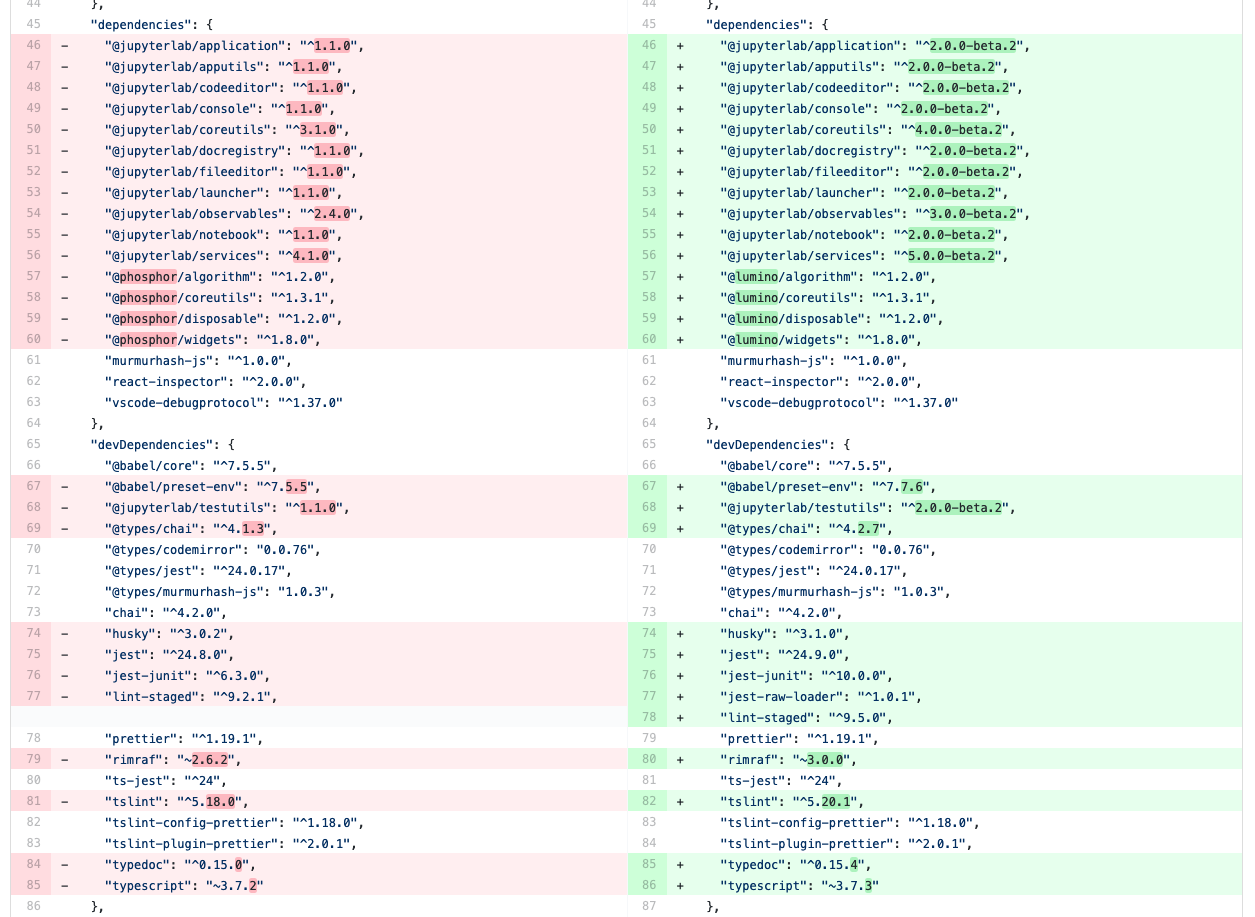
Updating the debugger extension’s libraries in package.json#
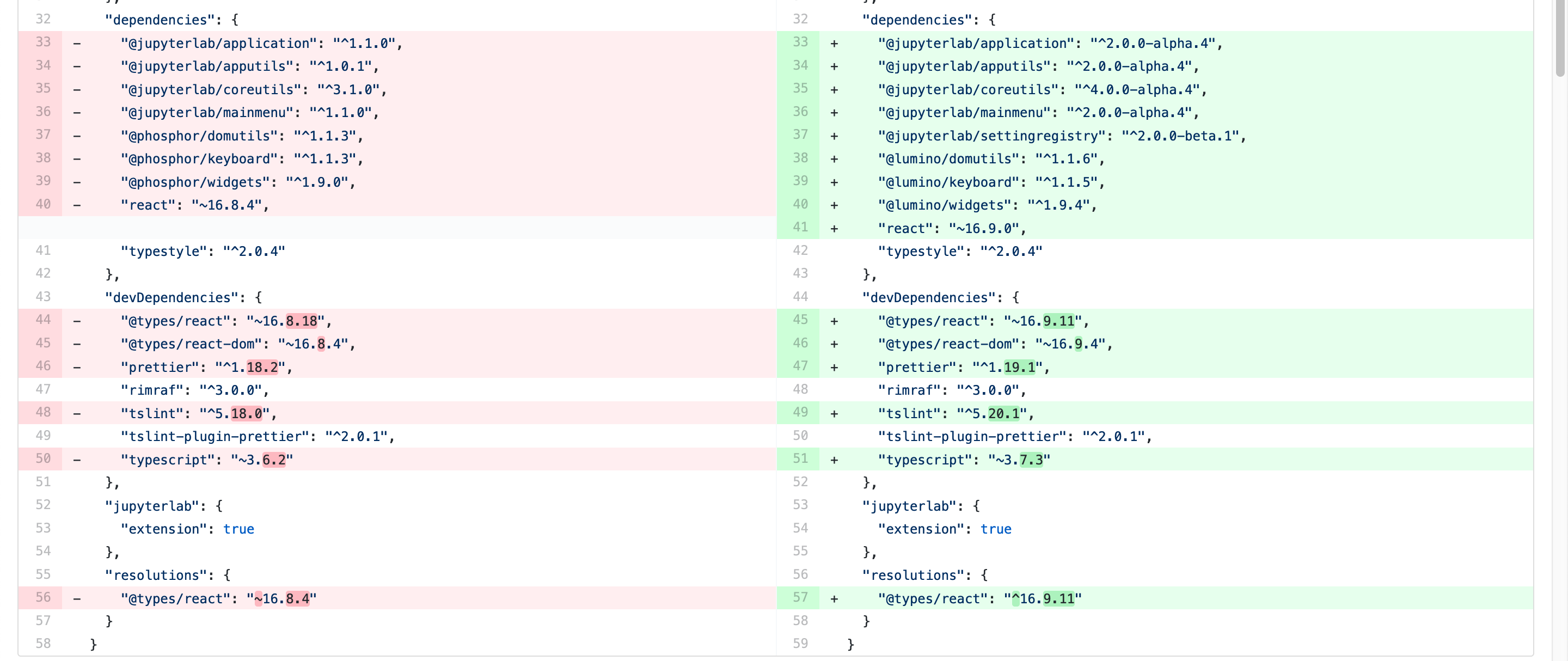
Updating the shortcuts UI extension’s libraries in package.json#
Tip
In these examples, note that we are using the 2.0.0-beta.x version of
many libraries. This was to test the extensions against the JupyterLab 2.0
beta release before the final version. For the final release, your
package.json should depend on version ^2.0.0 of these packages.
Migrating from @phosphor to @lumino
^^^^^^^^^^^^^^^^^^^^^^^^^^^^^^^^^^^^^^^^^^-
The foundational packages used by JupyterLab are now all prefixed with the NPM
namespace @lumino instead of @phosphor. The APIs for these packages
have not changed. The @phosphor namespaced imports need to be updated to
the new @lumino namespaced packages:
|
|
|
|
|
|
|
|
|
|
|
|
|
|
|
|
|
|
|
|
|
|
|
|
|
|
|
|
|
|
|
|
Warning
p- prefixed CSS classes, data-p- attributes and p- DOM events
are deprecated. They will continue to work until the next major release of
Lumino.
.p-CSS classes such as.p-Widgetshould be updated to.lm-, e.g..lm-Widgetdata-p-attributes such asdata-p-dragscrollshould be updated todata-lm-, e.g.data-lm-dragscrollp-DOM events such asp-dragentershould be updated tolm-, e.g.lm-dragenter
Updating former @jupyterlab/coreutils imports
^^^^^^^^^^^^^^^^^^^^^^^^^^^^^^^^^^^^^^^^^^^^^^^^-
JupyterLab 2.0 introduces several new packages with classes and tokens that
have been moved out of @jupyterlab/coreutils into their own packages. These
exports have been moved.
Tip
It might be helpful to delete node_modules and yarn.lock when
updating these libraries.
Export |
Package |
|---|---|
|
|
|
|
|
|
|
|
|
|
|
|
|
|
|
|
|
|
|
|
|
|
|
|
|
|
|
|
|
|
|
|
|
|
|
|
|
|
|
|
Using Session and SessionContext to manage kernel sessions#
Note
For full API documentation and examples of how to use
@jupyterlab/services,
consult the repository.
ConsolePanel and NotebookPanel now expose a
sessionContext: ISessionContext attribute that allows for a uniform way to
interact with kernel sessions.
Any widget that matches the interface IDocumentWidget has a
context: DocumentRegistry.IContext attribute with a
sessionContext: ISessionContext attribute.
For example, consider how the @jupyterlab/debugger extension’s
DebuggerService updated its isAvailable() method.
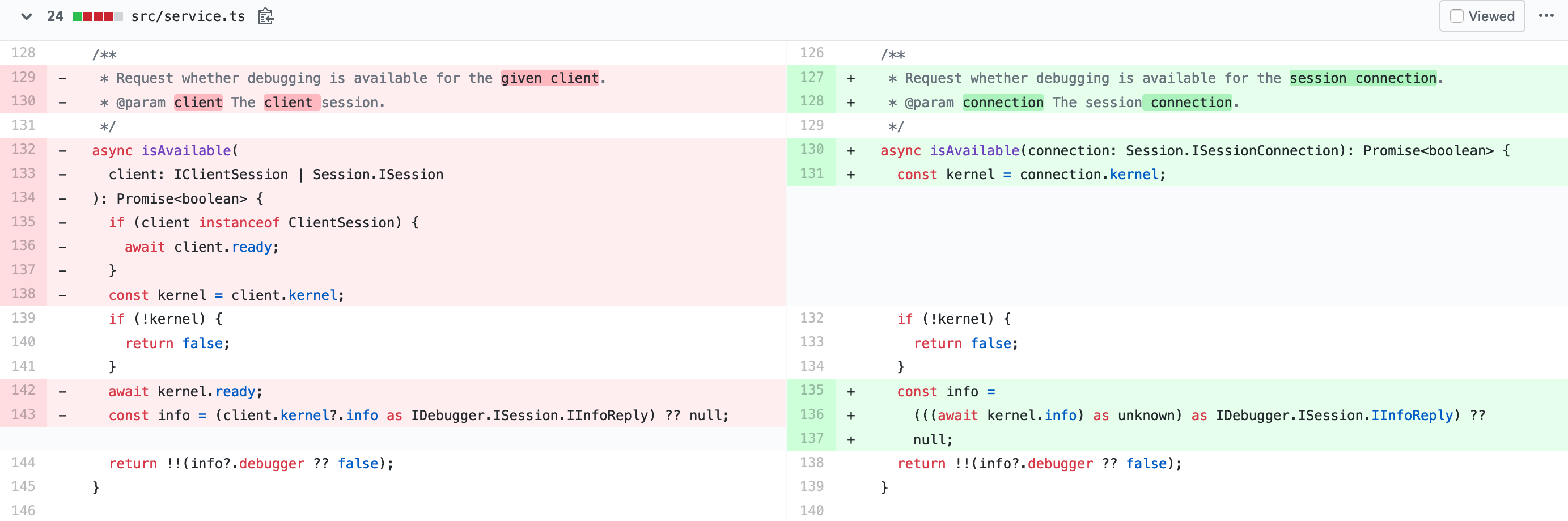
From the PR migrating the debugger extension to JupyterLab 2.0#
Note
await kernel.ready is no longer necessary before the kernel connection
kernel can be used. Kernel messages will be buffered as needed while a
kernel connection is coming online, so you should be able to use a kernel
connection immediately. If you want to retrieve the kernel info (or if for
some other reason you want to wait until at least one message has returned
from a new kernel connection), you can do await kernel.info.
Using the new icon system and LabIcon#
Note
For full API documentation and examples of how to use
the new icon support based on LabIcon from @jupyterlab/ui-components,
consult the repository.