


Commands#
Commands are the entry points for triggering actions for the user interface. They are linked to menu entries, keyboard shortcuts, the launcher and the command palette.
A command has an unique id that is used for referencing it or executing it. It could also require input arguments. Those arguments are maybe different in the command palette and the keyboard shortcuts for example. That can explain varying behavior depending on the source of a command trigger.
Commands in Markdown Files#
JupyterLab supports using commands in Markdown files with the following syntax:
`<button data-commandLinker-command="help:about" href="#">TEST</button>`
The value of data-commandLinker-command must be a valid command identifier (see list below).
This allows you to embed buttons or other elements with custom commands in your Markdown documents.
Command Palette#
All user actions in JupyterLab are processed through a centralized command system. These commands are shared and used throughout JupyterLab (menu bar, context menus, keyboard shortcuts, etc.). The command palette provides a keyboard-driven way to search for and run JupyterLab commands:
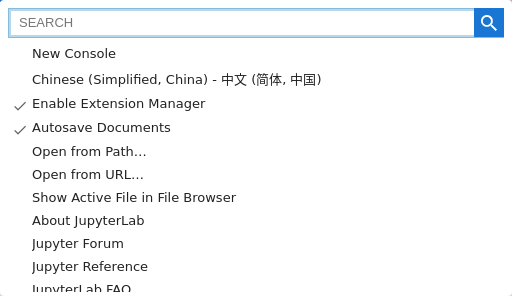
The command palette can be accessed from the View menu or using the keyboard shortcut
Command/Ctrl Shift C.
The command palette can be displayed in the sidebar by adding 'modal': false to the Settings.
Commands List#
The table below display the list of commands and the associated keyboard shortcuts. The unique identifier is useful if you want to customize the menus, the toolbars or the keyboard shortcuts.
Note
On Mac OS, the Ctrl key should be replaced by Cmd.
Application#
application:activate-next-tab#
Label: Activate Next Tab
Shortcuts: Ctrl Shift ]
Arguments: None
application:activate-next-tab-bar#
Label: Activate Next Tab Bar
Shortcuts: Ctrl Shift .
Arguments: None
application:activate-previous-tab#
Label: Activate Previous Tab
Shortcuts: Ctrl Shift [
Arguments: None
application:activate-previous-tab-bar#
Label: Activate Previous Tab Bar
Shortcuts: Ctrl Shift ,
Arguments: None
application:close#
Label: Close Tab
Shortcuts: Alt W
Arguments: None
application:close-all#
Label: Close All Tabs
Arguments: None
application:close-other-tabs#
Label: Close All Other Tabs
Arguments: None
application:close-right-tabs#
Label: Close Tabs to Right
Arguments: None
application:reset-layout#
Label: Reset Default Layout
Arguments: None
application:set-mode#
Label: Set the layout mode.
Arguments:
mode (
string) (required) - Options:"single-document","multiple-document": The layout mode
application:toggle-fullscreen-mode#
Label: Fullscreen Mode
Shortcuts: F11
Arguments: None
application:toggle-header#
Label: Show Header
Arguments: None
application:toggle-left-area#
Label: Show Left Sidebar
Shortcuts: Ctrl B
Arguments: None
application:toggle-mode#
Label: Simple Interface
Shortcuts: Ctrl Shift D
Arguments: None
application:toggle-presentation-mode#
Label: Presentation Mode
Arguments: None
application:toggle-right-area#
Label: Show Right Sidebar
Shortcuts: Ctrl J
Arguments: None
application:toggle-side-tabbar#
Label: Show Left Activity Bar
Arguments:
side (
string) (required) - Options:"left","right": The sidebar side
Apputils#
apputils:activate-command-palette#
Label: Activate Command Palette
Shortcuts: Ctrl Shift C
Arguments: None
apputils:adaptive-theme#
Label: Synchronize with System Settings
Arguments:
isPalette (
boolean): Whether the command is being called from the palette
apputils:change-dark-theme#
Label: Switch to the provided dark theme.
Arguments:
theme (
string) (required): The preferred dark theme nameisPalette (
boolean): Whether the command is being called from the palette
apputils:change-font#
Label: waiting for fonts
Arguments:
enabled (
boolean) (required): Whether the font is available and enabledfont (
string) (required): The font namekey (
string) (required): The CSS property key to modify
apputils:change-light-theme#
Label: Switch to the provided light theme.
Arguments:
theme (
string) (required): The preferred light theme nameisPalette (
boolean): Whether the command is being called from the palette
apputils:change-theme#
Label: Switch to the provided theme.
Arguments:
theme (
string) (required): The theme name to switch toisPalette (
boolean): Whether the command is being called from the palette
apputils:decr-font-size#
Label: Decrease Font Size
Arguments:
key (
string) (required): The font size key to decrease (e.g., “code-font-size”, “content-font-size1”, “ui-font-size1”)
apputils:dismiss-notification#
Label: Dismiss a notification
Arguments:
id (
string) (required): The notification ID to dismiss
apputils:display-notifications#
Label: Show Notifications
Arguments: None
apputils:display-shortcuts#
Label: Show Keyboard Shortcuts…
Shortcuts: Ctrl Shift H
Arguments: None
apputils:incr-font-size#
Label: Increase Font Size
Arguments:
key (
string) (required): The font size key to increase (e.g., “code-font-size”, “content-font-size1”, “ui-font-size1”)
apputils:license-report#
Label: Download All Licenses as Markdown
Arguments:
format (
string) (required): The report format to use for downloadnoLabel: Whether to hide the label (truthy values hide label)
apputils:licenses#
Label: Licenses
Arguments: None
apputils:licenses-refresh#
Label: Refresh Licenses
Arguments:
noLabel: Whether to hide the label (truthy values hide label)
apputils:load-statedb#
Label: Load state for the current workspace.
Arguments:
hash (
string): The URL hashpath (
string): The URL pathsearch (
string): The URL search string containing query parameters
apputils:notify#
Label: Emit a notification
Arguments:
message (
string) (required): The notification message texttype (
string): The notification type (e.g., “default”, “info”, “warning”, “error”)options (
object): Additional notification options
apputils:print#
Label: Print…
Shortcuts: Ctrl P
Arguments: None
apputils:reset#
Label: Reset Application State
Arguments:
reload (
boolean): Whether to reload the page after resetting
apputils:reset-on-load#
Label: Reset state when loading for the workspace.
Arguments:
hash (
string): The URL hashpath (
string): The URL pathsearch (
string): The URL search string containing query parameters
apputils:run-all-enabled#
Label: Run All Enabled Commands Passed as Args
Arguments:
commands (
array): Array of command IDs to runargs: Arguments to pass to the commands
errorIfNotEnabled (
boolean): Whether to log an error if a command is not enabled
apputils:run-first-enabled#
Label: Run First Enabled Command
Arguments:
commands (
array) (required): Array of command IDs to attempt to runargs: Arguments to pass to the commands
apputils:theme-scrollbars#
Label: Theme Scrollbars
Arguments: None
apputils:toggle-header#
Label: Show Header Above Content
Arguments: None
apputils:update-notification#
Label: Update a notification
Arguments:
id (
string) (required): The notification ID to updatemessage (
string) (required): The notification message texttype (
string): The notification type (e.g., “default”, “info”, “warning”, “error”)options (
object): Additional notification options
Code Viewer#
code-viewer:open#
Label: Open Code Viewer
Arguments:
content (
string) (required): The content to display in the code viewerlabel (
string): The label for the code viewermimeType (
string): The MIME type of the contentextension (
string): The file extension to derive MIME type fromwidgetId (
string): The ID to assign to the widget
Codemirror#
codemirror:delete-line#
Label: Delete the current line
Shortcuts: Ctrl D
Arguments: None
codemirror:fold-all#
Label: Fold All Regions
Arguments: None
codemirror:fold-current#
Label: Fold Current Region
Arguments: None
codemirror:fold-subregions#
Label: Fold All Subregions
Arguments: None
codemirror:select-next-occurrence#
Label: Select Next Occurrence
Shortcuts: Ctrl Shift D
Arguments: None
codemirror:toggle-block-comment#
Label: Toggle Block Comment
Shortcuts: Alt A
Arguments: None
codemirror:toggle-comment#
Label: Toggle Comment
Shortcuts: Ctrl /
Arguments: None
codemirror:toggle-tab-focus-mode#
Label: Toggle Tab Focus Mode
Arguments: None
codemirror:unfold-all#
Label: Unfold All Regions
Arguments: None
codemirror:unfold-current#
Label: Unfold Current Region
Arguments: None
codemirror:unfold-subregions#
Label: Unfold All Subregions
Arguments: None
Completer#
completer:invoke-console#
Label: Display the completion helper.
Shortcuts: Tab
Arguments: None
completer:invoke-file#
Label: Display the completion helper.
Shortcuts: Tab
Arguments: None
completer:invoke-notebook#
Label: Display the completion helper.
Shortcuts: Tab
Arguments:
activate (
boolean): Whether to activate the widget
completer:select-console#
Label: Select the completion suggestion.
Shortcuts: Enter
Arguments: None
completer:select-file#
Label: Select the completion suggestion.
Shortcuts: Enter
Arguments: None
completer:select-notebook#
Label: Select the completion suggestion.
Shortcuts: Enter
Arguments:
activate (
boolean): Whether to activate the widget
Console#
console:change-kernel#
Label: Change Kernel…
Arguments:
activate (
boolean): Whether to activate the widget
console:clear#
Label: Clear Console Cells
Arguments:
toolbar (
boolean): Whether executed from toolbaractivate (
boolean): Whether to activate the widget
console:close-and-shutdown#
Label: Close and Shut Down…
Arguments:
activate (
boolean): Whether to activate the widget
console:create#
Label: Console
Arguments:
isPalette (
boolean): Whether the command is executed from the paletteisLauncher (
boolean): Whether the command is executed from the launcherkernelPreference (
object): The kernel preference for the consolebasePath (
string): The base path for the consolecwd (
string): The current working directoryactivate (
boolean): Whether to activate the widgetref (
string): The reference widget id for the insert locationinsertMode (
string): The tab insert mode
console:get-kernel#
Label: Get Kernel
Arguments:
activate (
boolean): Whether to activate the widget
console:inject#
Label: Inject some code in a console.
Arguments:
path (
string) (required): The path of the console sessioncode (
string) (required): The code to injectmetadata (
object): The metadata for the codeactivate (
boolean): Whether to activate the widget
console:interaction-mode#
Label: Set the console interaction mode.
Arguments:
interactionMode (
string) - Options:"notebook","terminal": The interaction mode for the console
console:interrupt-kernel#
Label: Interrupt Kernel
Arguments:
activate (
boolean): Whether to activate the widget
console:linebreak#
Label: Insert Line Break
Shortcuts: Ctrl Enter
Arguments:
activate (
boolean): Whether to activate the widget
console:open#
Label: Open a console for the provided path.
Arguments:
path (
string) (required): The path of the session to openactivate (
boolean): Whether to activate the console widget
console:prompt-to-bottom#
Label: Prompt to bottom
Arguments:
activate (
boolean): Whether to activate the widgetisPalette (
boolean): Whether the command is executed from palette
console:prompt-to-left#
Label: Prompt to left
Arguments:
activate (
boolean): Whether to activate the widgetisPalette (
boolean): Whether the command is executed from palette
console:prompt-to-right#
Label: Prompt to right
Arguments:
activate (
boolean): Whether to activate the widgetisPalette (
boolean): Whether the command is executed from palette
console:prompt-to-top#
Label: Prompt to top
Arguments:
activate (
boolean): Whether to activate the widgetisPalette (
boolean): Whether the command is executed from palette
console:redo#
Label: Redo
Arguments:
activate (
boolean): Whether to activate the widget
console:replace-selection#
Label: Replace Selection in Console
Arguments:
text (
string): The text to replace the selection withactivate (
boolean): Whether to activate the widget
console:restart-kernel#
Label: Restart Kernel…
Arguments:
toolbar (
boolean): Whether executed from toolbaractivate (
boolean): Whether to activate the widget
console:run-forced#
Label: Run Cell (forced)
Shortcuts: Shift Enter
Arguments:
toolbar (
boolean): Whether executed from toolbaractivate (
boolean): Whether to activate the widget
console:run-unforced#
Label: Run Cell (unforced)
Shortcuts: Enter
Arguments:
toolbar (
boolean): Whether executed from toolbaractivate (
boolean): Whether to activate the widget
console:shutdown#
Label: Shut Down
Arguments:
activate (
boolean): Whether to activate the widget
console:toggle-autoclosing-brackets#
Label: Auto Close Brackets for Code Console Prompt
Arguments:
force (
boolean): Whether to force the toggle state
console:toggle-show-all-kernel-activity#
Label: Show All Kernel Activity
Arguments:
activate (
boolean): Whether to activate the widget
console:undo#
Label: Undo
Arguments:
activate (
boolean): Whether to activate the widget
CSV#
csv:go-to-line#
Label: Go to Line
Arguments: None
Debugger#
debugger:continue#
Label: Pause
Shortcuts: F9
Arguments: None
debugger:copy-to-clipboard#
Label: Copy to Clipboard
Arguments: None
debugger:copy-to-globals#
Label: Copy Variable to Globals
Arguments: None
debugger:evaluate#
Label: Evaluate Code
Arguments: None
debugger:inspect-variable#
Label: Inspect Variable
Arguments:
variableReference (
number): The variable reference to inspectname (
string): The name of the variable to inspect
debugger:invoke-console-completer#
Label: Display the tab completion widget.
Shortcuts: Tab
Arguments: None
debugger:next#
Label: Next
Shortcuts: F10
Arguments: None
debugger:open-source#
Label: Open Source
Arguments:
path (
string): Path to the source file to open
debugger:pause-on-exceptions#
Label: Breakpoints on exception
Arguments:
filter (
string): Exception filter to pause ondescription (
string): Description of the exception filter
debugger:render-mime-variable#
Label: Render Variable
Arguments:
frameId (
number): The frame IDname (
string): The name of the variable to render
debugger:restart-debug#
Label: Restart Kernel and Debug…
Arguments: None
debugger:run-in-console#
Label: Execute the current line in debug console.
Shortcuts: Shift Enter
Arguments: None
debugger:select-console-completion#
Label: Select the completion suggestion.
Shortcuts: Enter
Arguments: None
debugger:show-panel#
Label: Debugger Panel
Shortcuts: Ctrl Shift E
Arguments: None
debugger:stepIn#
Label: Step In
Shortcuts: F11
Arguments: None
debugger:stepOut#
Label: Step Out
Shortcuts: Shift F11
Arguments: None
debugger:terminate#
Label: Terminate
Shortcuts: Shift F9
Arguments: None
Doc Manager#
docmanager:clear-recents#
Label: Clear Recent Documents
Arguments: None
docmanager:clone#
Label: New View for
Arguments:
options (
object): Options for opening the cloned document
docmanager:delete#
Label: Delete
Arguments: None
docmanager:delete-file#
Label: Delete
Arguments:
path (
string) (required): The path of the file to delete
docmanager:download#
Label: Download
Arguments: None
docmanager:duplicate#
Label: Duplicate
Arguments: None
docmanager:new-untitled#
Label: New undefined
Arguments:
error (
string): The error title to displaypath (
string): The path where to create the filetype (
string) - Options:"file","directory","notebook": The type of content to createext (
string): The file extension (for file type)label (
string): The label for the command
docmanager:open#
Label: Open the provided path.
Arguments:
path (
string): The path of the file to openfactory (
string): The widget factory namekernel (
object): The kernel model to usekernelPreference (
object): Override kernel preferences, seeIKernelPreferencefor possible valuesoptions (
object): Additional options for openingicon (
string): The icon class for the commandlabel (
string): The label for the commandmnemonic (
number): The mnemonic index for the command
docmanager:open-browser-tab#
Label: Open in New Browser Tab
Arguments:
path (
string) (required): The path of the file to open in browser tabicon (
string): The icon class for the command
docmanager:reload#
Label: Reload from Disk
Arguments: None
docmanager:rename#
Label: Rename…
Arguments: None
docmanager:restore-checkpoint#
Label: Revert to Checkpoint…
Arguments: None
docmanager:save#
Label: Save
Shortcuts: Ctrl S
Arguments:
toolbar (
boolean): Whether executed from toolbar_luminoEvent (
object): The lumino event object
docmanager:save-all#
Label: Save All
Arguments: None
docmanager:save-as#
Label: Save As…
Shortcuts: Ctrl Shift S
Arguments: None
docmanager:show-in-file-browser#
Label: Show in File Browser
Arguments: None
docmanager:toggle-autosave#
Label: Autosave Documents
Arguments: None
Document Search#
documentsearch:end#
Label: End Search
Shortcuts: Escape
Arguments: None
documentsearch:highlightNext#
Label: Find Next
Shortcuts: Ctrl G
Arguments: None
documentsearch:highlightPrevious#
Label: Find Previous
Shortcuts: Ctrl Shift G
Arguments: None
documentsearch:start#
Label: Find…
Shortcuts: Ctrl F
Arguments:
searchText (
string): The text to search for
documentsearch:startWithReplace#
Label: Find and Replace…
Arguments:
searchText (
string): The text to search forreplaceText (
string): The text to replace with
documentsearch:toggleSearchInSelection#
Label: Search in Selection
Shortcuts: Alt L
Arguments: None
Extension Manager#
extensionmanager:show-panel#
Label: Extension Manager
Shortcuts: Ctrl Shift X
Arguments: None
extensionmanager:toggle#
Label: Enable Extension Manager
Arguments: None
File Browser#
filebrowser:activate#
Label: Open the file browser for the provided path.
Arguments:
path (
string): The path to open in the file browser
filebrowser:copy#
Label: Copy
Shortcuts: Ctrl C
Arguments: None
filebrowser:copy-download-link#
Label: Copy Download Link
Arguments: None
filebrowser:copy-path#
Label: Copy Path
Arguments: None
filebrowser:create-new-directory#
Label: New Folder
Arguments: None
filebrowser:create-new-file#
Label: New File
Arguments:
label (
string): The command label.iconName (
string): The command icon.ext (
string): The file extension.
filebrowser:create-new-markdown-file#
Label: New Markdown File
Arguments: None
filebrowser:cut#
Label: Cut
Shortcuts: Ctrl X
Arguments: None
filebrowser:delete#
Label: Move to Trash
Shortcuts: Delete
Arguments: None
filebrowser:download#
Label: Download
Arguments: None
filebrowser:duplicate#
Label: Duplicate
Shortcuts: Ctrl D
Arguments: None
filebrowser:go-to-path#
Label: Update the file browser to display the provided path.
Arguments:
path (
string): The path to navigate todontShowBrowser (
boolean): Whether to avoid showing the browser
filebrowser:go-up#
Label: go up
Shortcuts: Backspace
Arguments: None
filebrowser:hide-main#
Label: Hide the file browser.
Arguments: None
filebrowser:open#
Label: Open
Arguments:
factory (
string): The name of the widget factory to uselabel (
string): The label to display for the command
filebrowser:open-browser-tab#
Label: Open in New Browser Tab
Arguments:
mode (
string): Mode for opening files (e.g., single-document)
filebrowser:open-path#
Label: Open from Path…
Arguments:
path (
string): Path to the file or directory to opendontShowBrowser (
boolean): Whether to avoid showing the file browser
filebrowser:open-url#
Label: Open from URL…
Arguments:
url (
string): URL of the file to open
filebrowser:paste#
Label: Paste
Shortcuts: Ctrl V
Arguments: None
filebrowser:refresh#
Label: Refresh File List
Arguments: None
filebrowser:rename#
Label: Rename
Shortcuts: F2
Arguments: None
filebrowser:search#
Label: Search on File Names
Arguments: None
filebrowser:select-all#
Label: Select All
Shortcuts: Ctrl A
Arguments: None
filebrowser:shutdown#
Label: Shut Down Kernel
Arguments: None
filebrowser:toggle-file-checkboxes#
Label: Show File Checkboxes
Arguments: None
filebrowser:toggle-file-filter#
Label: Toggle File Filter
Arguments: None
filebrowser:toggle-file-size#
Label: Show File Size Column
Arguments: None
filebrowser:toggle-last-modified#
Label: Show Last Modified Column
Arguments: None
filebrowser:toggle-main#
Label: File Browser
Shortcuts: Ctrl Shift F
Arguments: None
filebrowser:toggle-show-full-path#
Label: Show Full Path
Arguments: None
filebrowser:toggle-sort-notebooks-first#
Label: Sort Notebooks Above Files
Arguments: None
File Editor#
fileeditor:change-font-size#
Label: Decrease Font Size
Arguments:
delta (
number) (required): The font size change delta (positive to increase, negative to decrease)isMenu (
boolean): Whether the command is called from a menu context
fileeditor:change-language#
Label: Change editor language.
Arguments:
name (
string): The language name to change todisplayName (
string): The display name of the language
fileeditor:change-tabs#
Label: Indent with Tab
Arguments:
size (
string): The number of spaces for indentation (or Tab for tab indentation)
fileeditor:change-theme#
Label: jupyter
Arguments:
theme (
string): The theme name to change todisplayName (
string): The display name of the theme
fileeditor:copy#
Label: Copy
Arguments: None
fileeditor:create-console#
Label: Create Console for Editor
Arguments: None
fileeditor:create-new#
Label: Text File
Arguments:
cwd (
string): The current working directory pathfileExt (
string): The file extension for the new fileisPalette (
boolean): Whether the command is being called from the command palettepaletteLabel (
string): The label to show in the command palettelauncherLabel (
string): The label to show in the launchercaption (
string): The caption for the commandiconName (
string): The name of the icon to use
fileeditor:create-new-markdown-file#
Label: Markdown File
Arguments:
cwd (
string): The current working directory pathisPalette (
boolean): Whether the command is being called from the command palette
fileeditor:cut#
Label: Cut
Arguments: None
fileeditor:find#
Label: Find…
Arguments: None
fileeditor:go-to-line#
Label: Go to Line…
Arguments:
line (
number): The line number to go to (1-indexed)column (
number): The column number to go to (1-indexed)
fileeditor:markdown-preview#
Label: Show Markdown Preview
Arguments: None
fileeditor:paste#
Label: Paste
Arguments: None
fileeditor:redo#
Label: Redo
Arguments: None
fileeditor:replace-selection#
Label: Replace Selection in Editor
Arguments:
text (
string): The text to replace the current selection with
fileeditor:restart-console#
Label: Restart Kernel
Arguments: None
fileeditor:run-all#
Label: Run All Code
Arguments: None
fileeditor:run-code#
Label: Run Selected Code
Arguments: None
fileeditor:select-all#
Label: Select All
Arguments: None
fileeditor:toggle-autoclosing-brackets#
Label: Auto Close Brackets in Text Editor
Arguments:
force (
boolean): Force enable/disable auto closing brackets
fileeditor:toggle-autoclosing-brackets-universal#
Label: Auto Close Brackets
Arguments: None
fileeditor:toggle-current-line-numbers#
Label: Show Line Numbers
Arguments: None
fileeditor:toggle-current-line-wrap#
Label: Wrap Words
Arguments: None
fileeditor:toggle-current-match-brackets#
Label: Match Brackets
Arguments: None
fileeditor:toggle-line-numbers#
Label: Show Line Numbers
Arguments: None
fileeditor:toggle-line-wrap#
Label: Word Wrap
Arguments:
mode (
boolean): Whether to enable word wrap
fileeditor:toggle-match-brackets#
Label: Match Brackets
Arguments: None
fileeditor:undo#
Label: Undo
Arguments: None
Help#
help:about#
Label: About JupyterLab
Arguments: None
help:jupyter-forum#
Label: Jupyter Forum
Arguments: None
help:license-report#
Label: Download All Licenses
Arguments: None
help:licenses#
Label: Licenses
Arguments: None
help:licenses-refresh#
Label: Refresh Licenses
Arguments: None
help:open#
Label: Open the provided url in a tab.
Arguments:
url (
string) (required): The URL to opentext (
string): The text label for the tabnewBrowserTab (
boolean): Whether to open in a new browser tab
HTML Viewer#
htmlviewer:trust-html#
Label: Trust HTML File
Arguments: None
Image Viewer#
imageviewer:flip-horizontal#
Label: Flip image horizontally
Shortcuts: H
Arguments: None
imageviewer:flip-vertical#
Label: Flip image vertically
Shortcuts: V
Arguments: None
imageviewer:invert-colors#
Label: Invert Colors
Shortcuts: I
Arguments: None
imageviewer:reset-image#
Label: Reset Image
Shortcuts: 0
Arguments: None
imageviewer:rotate-clockwise#
Label: Rotate Clockwise
Shortcuts: ]
Arguments: None
imageviewer:rotate-counterclockwise#
Label: Rotate Counterclockwise
Shortcuts: [
Arguments: None
imageviewer:zoom-in#
Label: Zoom In
Shortcuts: =
Arguments: None
imageviewer:zoom-out#
Label: Zoom Out
Shortcuts: -
Arguments: None
Inline Completer#
inline-completer:accept#
Label: Accept Inline Completion
Shortcuts: Tab
Arguments: None
inline-completer:invoke#
Label: Invoke Inline Completer
Shortcuts: Alt </kbd>
Arguments: None
inline-completer:next#
Label: Next Inline Completion
Shortcuts: Alt ]
Arguments: None
inline-completer:previous#
Label: Previous Inline Completion
Shortcuts: Alt [
Arguments: None
Inspector#
inspector:close#
Label: Hide Contextual Help
Shortcuts: Ctrl I
Arguments:
isLauncher (
boolean): Whether command is called from launcher
inspector:open#
Label: Show Contextual Help
Shortcuts: Ctrl I
Arguments:
text (
string): Text to display in the inspectorrefresh (
boolean): Whether to refresh the inspectorisLauncher (
boolean): Whether command is called from launcher
inspector:toggle#
Label: Show Contextual Help
Arguments:
text (
string): Text to display in the inspector
Jupyterlab Translation#
jupyterlab-translation:en#
Label: English
Arguments: None
jupyterlab-translation:zh_CN#
Label: Chinese (Simplified, China) - 中文 (简体, 中国)
Arguments: None
Launcher#
launcher:create#
Label: New Launcher
Shortcuts: Ctrl Shift L
Arguments:
cwd (
string): The current working directorytoolbar (
boolean): Whether the command is executed from a toolbaractivate (
boolean): Whether to activate the widgetref (
string): The reference widget id
Log Console#
logconsole:add-checkpoint#
Label: Add Checkpoint
Arguments: None
logconsole:clear#
Label: Clear Log
Arguments: None
logconsole:open#
Label: Show Log Console
Arguments:
source (
string): The source for the log consoleinsertMode (
string): The insert mode for the dock layoutref (
string): The reference widget
logconsole:set-level#
Label: Set log level to level.
Arguments:
level (
string) (required) - Options:"Critical","Error","Warning","Info","Debug": The log level to set
Markdown Viewer#
markdownviewer:edit#
Label: Show Markdown Editor
Arguments: None
markdownviewer:open#
Label: Markdown Preview
Arguments:
path (
string) (required): The path to the markdown file to previewoptions (
object): Options for opening the preview
Mathjax#
mathjax:clipboard#
Label: MathJax Copy Latex
Arguments: None
mathjax:scale#
Label: Mathjax Scale Reset
Arguments:
scale (
number): The scale factor for MathJax rendering
Mermaid#
mermaid:copy-source#
Label: Mermaid Copy Diagram Source
Arguments: None
Notebook#
notebook:access-next-history-entry#
Label: Access Next Kernel History Entry
Shortcuts: Alt ArrowDown
Arguments: None
notebook:access-previous-history-entry#
Label: Access Previous Kernel History Entry
Shortcuts: Alt ArrowUp
Arguments: None
notebook:change-cell-to-code#
Label: Change to Code Cell Type
Shortcuts: Y
Arguments: None
notebook:change-cell-to-heading-1#
Label: Change to Heading 1
Shortcuts: 1
Arguments: None
notebook:change-cell-to-heading-2#
Label: Change to Heading 2
Shortcuts: 2
Arguments: None
notebook:change-cell-to-heading-3#
Label: Change to Heading 3
Shortcuts: 3
Arguments: None
notebook:change-cell-to-heading-4#
Label: Change to Heading 4
Shortcuts: 4
Arguments: None
notebook:change-cell-to-heading-5#
Label: Change to Heading 5
Shortcuts: 5
Arguments: None
notebook:change-cell-to-heading-6#
Label: Change to Heading 6
Shortcuts: 6
Arguments: None
notebook:change-cell-to-markdown#
Label: Change to Markdown Cell Type
Shortcuts: M
Arguments: None
notebook:change-cell-to-raw#
Label: Change to Raw Cell Type
Shortcuts: R
Arguments: None
notebook:change-kernel#
Label: Change Kernel…
Arguments: None
notebook:clear-all-cell-outputs#
Label: Clear Outputs of All Cells
Arguments: None
notebook:clear-cell-output#
Label: Clear Cell Output
Arguments: None
notebook:close-and-shutdown#
Label: Close and Shut Down Notebook…
Arguments: None
notebook:collapse-all-headings#
Label: Collapse All Headings
Shortcuts: Ctrl Shift ArrowLeft
Arguments: None
notebook:copy-cell#
Label: Copy Cell
Shortcuts: C
Arguments:
toolbar (
boolean): Whether the command is being executed from the toolbaractivate (
boolean): Whether to activate the notebook after execution
notebook:copy-to-clipboard#
Label: Copy Output to Clipboard
Arguments: None
notebook:create-console#
Label: New Console for Notebook
Arguments:
activate (
boolean): Whether to activate the console after creation
notebook:create-new#
Label: Notebook
Arguments:
cwd (
string): Current working directory for the new notebookkernelId (
string): Kernel ID to use for the new notebookkernelName (
string): Kernel name to use for the new notebookisLauncher (
boolean): Whether the command is executed from launcherisPalette (
boolean): Whether the command is executed from paletteisContextMenu (
boolean): Whether the command is executed from context menu
notebook:create-output-view#
Label: Create New View for Cell Output
Arguments:
path (
string): The path to the notebook containing the cellindex (
number): The index of the cell to create an output view for
notebook:create-subshell-console#
Label: New Subshell Console for Notebook
Arguments:
activate (
boolean): Whether to activate the console after creation
notebook:cut-cell#
Label: Cut Cell
Shortcuts: X
Arguments:
toolbar (
boolean): Whether the command is being executed from the toolbaractivate (
boolean): Whether to activate the notebook after execution
notebook:delete-cell#
Label: Delete Cell
Shortcuts: D D
Arguments:
toolbar (
boolean): Whether the command is being executed from the toolbaractivate (
boolean): Whether to activate the notebook after execution
notebook:deselect-all#
Label: Deselect All Cells
Arguments: None
notebook:disable-output-scrolling#
Label: Disable Scrolling for Outputs
Arguments: None
notebook:duplicate-below#
Label: Duplicate Cell Below
Arguments:
toolbar (
boolean): Whether the command is being executed from the toolbaractivate (
boolean): Whether to activate the notebook after execution
notebook:enable-output-scrolling#
Label: Enable Scrolling for Outputs
Arguments: None
notebook:enter-command-mode#
Label: Enter Command Mode
Shortcuts: Escape
Arguments: None
notebook:enter-edit-mode#
Label: Enter Edit Mode
Shortcuts: Enter
Arguments: None
notebook:expand-all-headings#
Label: Expand All Headings
Shortcuts: Ctrl Shift ArrowRight
Arguments: None
notebook:export-to-format#
Label: Save and Export Notebook to the given format.
Arguments:
format (
string) (required): The export format (e.g., pdf, html, latex)label (
string): The label to display for this formatisPalette (
boolean): Whether the command is called from the command palette
notebook:extend-marked-cells-above#
Label: Extend Selection Above
Shortcuts: Shift ArrowUp
Arguments: None
notebook:extend-marked-cells-below#
Label: Extend Selection Below
Shortcuts: Shift ArrowDown
Arguments: None
notebook:extend-marked-cells-bottom#
Label: Extend Selection to Bottom
Shortcuts: Shift End
Arguments: None
notebook:extend-marked-cells-top#
Label: Extend Selection to Top
Shortcuts: Shift Home
Arguments: None
notebook:get-kernel#
Label: Get Kernel
Arguments:
activate (
boolean): Whether to activate the notebook after execution
notebook:hide-all-cell-code#
Label: Collapse All Code
Arguments: None
notebook:hide-all-cell-outputs#
Label: Collapse All Outputs
Arguments: None
notebook:hide-cell-code#
Label: Collapse Selected Code
Arguments: None
notebook:hide-cell-outputs#
Label: Collapse Selected Outputs
Arguments: None
notebook:insert-cell-above#
Label: Insert Cell Above
Shortcuts: A
Arguments:
toolbar (
boolean): Whether the command is being executed from the toolbar
notebook:insert-cell-below#
Label: Insert Cell Below
Shortcuts: B
Arguments:
toolbar (
boolean): Whether the command is being executed from the toolbar
notebook:insert-heading-above#
Label: Insert Heading Above Current Heading
Shortcuts: Shift A
Arguments: None
notebook:insert-heading-below#
Label: Insert Heading Below Current Heading
Shortcuts: Shift B
Arguments: None
notebook:interrupt-kernel#
Label: Interrupt Kernel
Arguments:
toolbar (
boolean): Whether the command is being executed from the toolbar
notebook:merge-cell-above#
Label: Merge Cell Above
Shortcuts: Ctrl Backspace
Arguments: None
notebook:merge-cell-below#
Label: Merge Cell Below
Shortcuts: Ctrl Shift M
Arguments: None
notebook:merge-cells#
Label: Merge Selected Cells
Shortcuts: Shift M
Arguments: None
notebook:move-cell-down#
Label: Move Cell Down
Shortcuts: Ctrl Shift ArrowDown
Arguments:
toolbar (
boolean): Whether the command is being executed from the toolbaractivate (
boolean): Whether to activate the notebook after execution
notebook:move-cell-up#
Label: Move Cell Up
Shortcuts: Ctrl Shift ArrowUp
Arguments:
toolbar (
boolean): Whether the command is being executed from the toolbaractivate (
boolean): Whether to activate the notebook after execution
notebook:move-cursor-down#
Label: Select Cell Below
Shortcuts: ArrowDown
Arguments: None
notebook:move-cursor-heading-above-or-collapse#
Label: Select Heading Above or Collapse Heading
Shortcuts: ArrowLeft
Arguments: None
notebook:move-cursor-heading-below-or-expand#
Label: Select Heading Below or Expand Heading
Shortcuts: ArrowRight
Arguments: None
notebook:move-cursor-up#
Label: Select Cell Above
Shortcuts: ArrowUp
Arguments: None
notebook:paste-and-replace-cell#
Label: Paste Cell and Replace
Arguments:
activate (
boolean): Whether to activate the notebook after execution
notebook:paste-cell-above#
Label: Paste Cell Above
Arguments:
activate (
boolean): Whether to activate the notebook after execution
notebook:paste-cell-below#
Label: Paste Cell Below
Shortcuts: V
Arguments:
toolbar (
boolean): Whether the command is being executed from the toolbaractivate (
boolean): Whether to activate the notebook after execution
notebook:reconnect-to-kernel#
Label: Reconnect to Kernel
Arguments: None
notebook:redo#
Label: Redo
Arguments: None
notebook:redo-cell-action#
Label: Redo Cell Operation
Shortcuts: Shift Z
Arguments: None
notebook:render-all-markdown#
Label: Render All Markdown Cells
Arguments: None
notebook:replace-selection#
Label: Replace Selection in Notebook Cell
Arguments:
text (
string): Text to replace the selection with
notebook:restart-and-run-to-selected#
Label: Restart Kernel and Run up to Selected Cell…
Arguments:
activate (
boolean): Whether to activate the notebook after execution
notebook:restart-clear-output#
Label: Restart Kernel and Clear Outputs of All Cells…
Arguments: None
notebook:restart-kernel#
Label: Restart Kernel…
Arguments:
toolbar (
boolean): Whether the command is being executed from the toolbar
notebook:restart-run-all#
Label: Restart Kernel and Run All Cells…
Arguments:
toolbar (
boolean): Whether the command is being executed from the toolbaractivate (
boolean): Whether to activate the notebook after execution
notebook:run-all-above#
Label: Run All Above Selected Cell
Arguments: None
notebook:run-all-below#
Label: Run Selected Cell and All Below
Arguments: None
notebook:run-all-cells#
Label: Run All Cells
Arguments: None
notebook:run-cell#
Label: Run Selected Cell and Do not Advance
Shortcuts: Ctrl Enter
Arguments:
activate (
boolean): Whether to activate the notebook after execution
notebook:run-cell-and-insert-below#
Label: Run Selected Cell and Insert Below
Shortcuts: Alt Enter
Arguments:
activate (
boolean): Whether to activate the notebook after execution
notebook:run-cell-and-select-next#
Label: Run Selected Cell
Shortcuts: Shift Enter
Arguments:
toolbar (
boolean): Whether the command is being executed from the toolbaractivate (
boolean): Whether to activate the notebook after execution
notebook:run-in-console#
Label: Run Selected Text or Current Line in Console
Arguments: None
notebook:select-all#
Label: Select All Cells
Shortcuts: Ctrl A
Arguments: None
notebook:select-last-run-cell#
Label: Select current running or last run cell
Arguments: None
notebook:set-side-by-side-ratio#
Label: Set side-by-side ratio
Arguments: None
notebook:show-all-cell-code#
Label: Expand All Code
Arguments: None
notebook:show-all-cell-outputs#
Label: Expand All Outputs
Arguments: None
notebook:show-cell-code#
Label: Expand Selected Code
Arguments: None
notebook:show-cell-outputs#
Label: Expand Selected Outputs
Arguments: None
notebook:shutdown-kernel#
Label: Shut Down Kernel
Arguments: None
notebook:split-cell-at-cursor#
Label: Split Cell
Shortcuts: Ctrl Shift -
Arguments: None
notebook:toggle-all-cell-line-numbers#
Label: Show Line Numbers
Arguments:
activate (
boolean): Whether to activate the notebook after execution
notebook:toggle-autoclosing-brackets#
Label: Auto Close Brackets for All Notebook Cell Types
Arguments:
force (
boolean): Force toggling the auto closing brackets setting
notebook:toggle-cell-outputs#
Label: Toggle Visibility of Selected Outputs
Arguments: None
notebook:toggle-heading-collapse#
Label: Toggle Collapse Notebook Heading
Arguments: None
notebook:toggle-render-side-by-side-current#
Label: Render Side-by-Side
Shortcuts: Shift R
Arguments:
activate (
boolean): Whether to activate the notebook after execution
notebook:toggle-virtual-scrollbar#
Label: Show Minimap
Arguments: None
notebook:trust#
Label: Trust Notebook
Arguments: None
notebook:undo#
Label: Undo
Arguments: None
notebook:undo-cell-action#
Label: Undo Cell Operation
Shortcuts: Z
Arguments: None
Plugin Manager#
pluginmanager:open#
Label: Advanced Plugin Manager
Arguments:
query (
string): The search query for pluginsisDisclaimed (
boolean): Whether the disclaimer has been accepted
pluginmanager:refresh#
Label: Refresh Plugin List
Arguments:
noLabel (
boolean): Whether to hide the label
Property Inspector#
property-inspector:show-panel#
Label: Property Inspector
Shortcuts: Ctrl Shift U
Arguments: None
Rendermime#
rendermime:handle-local-link#
Label: Handle Local Link
Arguments:
path (
string) (required): The file path to openid (
string): Fragment identifier to navigate toscope (
string) - Options:"kernel","server": Scope of the file location
Running#
running:kernel-new-console#
Label: New Console for Kernel
Arguments:
id (
string): Kernel ID to create console for
running:kernel-new-notebook#
Label: New Notebook for Kernel
Arguments:
id (
string): Kernel ID to create notebook for
running:kernel-open-session#
Label: Unknown Session
Arguments:
path (
string): Path to the session to opentype (
string): Type of session (console or notebook)name (
string): Name of the session
running:kernel-shut-down#
Label: Shut Down Kernel
Arguments:
id (
string): Kernel ID to shut down
running:kernel-shut-down-unused#
Label: Shut Down Unused
Arguments:
toolbar (
boolean): Whether executed from toolbar
running:show-modal#
Label: Search Tabs and Running Sessions
Shortcuts: Ctrl Alt A
Arguments: None
running:show-panel#
Label: Sessions and Tabs
Shortcuts: Ctrl Shift B
Arguments: None
Setting Editor#
settingeditor:export#
Label: Export Settings
Arguments: None
settingeditor:import#
Label: Import Settings
Arguments: None
settingeditor:open#
Label: Settings Editor
Shortcuts: Ctrl ,
Arguments:
query (
string): Search query to filter settingssettingEditorType (
string) - Options:"ui","json": Type of settings editor to openlabel (
string): Custom label for the command
settingeditor:open-json#
Label: Advanced Settings Editor
Arguments: None
settingeditor:revert#
Label: Revert User Settings
Arguments: None
settingeditor:save#
Label: Save User Settings
Shortcuts: Ctrl S
Arguments: None
Shortcuts#
shortcuts:add-keybinding#
Label: Add Keybinding
Arguments: None
shortcuts:delete-keybinding#
Label: Delete Keybinding
Arguments: None
shortcuts:edit-keybinding#
Label: Edit Keybinding
Arguments: None
shortcuts:reset-all#
Label: Reset All
Arguments: None
shortcuts:toggle-selectors#
Label: Toggle Selectors
Arguments: None
Statusbar#
statusbar:toggle#
Label: Show Status Bar
Arguments: None
Terminal#
terminal:copy#
Label: Copy
Arguments: None
terminal:create-new#
Label: Terminal
Arguments:
name (
string): Terminal session namecwd (
string): Current working directory for the terminalisPalette (
boolean): Whether the command is called from the command palette
terminal:decrease-font#
Label: Decrease Terminal Font Size
Arguments: None
terminal:increase-font#
Label: Increase Terminal Font Size
Arguments: None
terminal:open#
Label: Open a terminal by its name.
Arguments:
name (
string) (required): Terminal session name to open
terminal:paste#
Label: Paste
Arguments: None
terminal:refresh#
Label: Refresh Terminal
Arguments:
isPalette (
boolean): Whether the command is called from the command palette
terminal:set-theme#
Label: Set terminal theme to the provided theme.
Arguments:
theme (
string) (required) - Options:"inherit","light","dark": Terminal theme to setisPalette (
boolean): Whether the command is called from the command palette
terminal:shut-down#
Label: Shutdown Terminal
Arguments: None
TOC#
toc:display-h1-numbering#
Label: Show first-level heading number
Arguments: None
toc:display-numbering#
Label: Show heading number in the document
Arguments:
toolbar (
boolean): Whether the command is called from toolbar
toc:display-outputs-numbering#
Label: Show output headings
Arguments: None
toc:run-cells#
Label: Select and Run Cell(s) for this Heading
Arguments:
activate (
boolean): Whether to activate the notebook after execution
toc:show-panel#
Label: Table of Contents
Shortcuts: Ctrl Shift K
Arguments: None
toc:toggle-collapse#
Label: Collapse All Headings
Arguments:
toolbar (
boolean): Whether the command is called from toolbar
Tooltip#
tooltip:dismiss#
Label: Dismiss the tooltip
Shortcuts: Escape
Arguments: None
tooltip:launch-console#
Label: Open the tooltip
Shortcuts: Shift Tab
Arguments: None
tooltip:launch-file#
Label: Open the tooltip
Shortcuts: Shift Tab
Arguments: None
tooltip:launch-notebook#
Label: Open the tooltip
Shortcuts: Shift Tab
Arguments: None
TSV#
tsv:go-to-line#
Label: Go to Line
Arguments: None
Workspace Indicator#
workspace-indicator:toggle#
Label: Show Workspace Indicator
Arguments: None
Workspace UI#
workspace-ui:clone#
Label: Clone Workspace…
Arguments:
workspace (
string): Workspace identifier to clone
workspace-ui:create-new#
Label: Create New Workspace…
Arguments:
workspace (
string): Workspace identifier for the new workspace
workspace-ui:delete#
Label: Delete Workspace…
Arguments:
workspace (
string): Workspace identifier to delete
workspace-ui:export#
Label: Export Workspace…
Arguments:
workspace (
string): Workspace identifier to export
workspace-ui:import#
Label: Import Workspace…
Arguments: None
workspace-ui:open#
Label: Open Workspace…
Arguments:
workspace (
string): Workspace identifier to open
workspace-ui:rename#
Label: Rename Workspace…
Arguments:
workspace (
string): Workspace identifier to rename
workspace-ui:reset#
Label: Reset Workspace…
Arguments:
workspace (
string): Workspace identifier to reset
workspace-ui:save#
Label: Save Current Workspace
Arguments: None
workspace-ui:save-as#
Label: Save Current Workspace As…
Arguments: None